

Updated
November 13, 2026
Clover vs Lightspeed: Which POS Is Right for a Small Retail Store?
Clover vs Lightspeed compares two retail POS systems with different strengths. Clover suits stores needing straightforward checkout and integrated payments, while Lightspeed offers advanced inventory and purchasing tools. Both support online selling, and SKU IQ helps keep inventory synchronized across connected sales channels.


TL;DR
- Clover suits small retailers with simple catalogs, dedicated checkout hardware, and integrated payment processing.
- Lightspeed Retail offers advanced variant management, purchase orders, reorder points, and serialized inventory tracking.
- Clover Standard starts at $84.95 monthly after hardware purchase, while Lightspeed Basic costs $89 monthly with annual billing.
- eCommerce accounted for 17.1% of US retail sales in Q2 2026, highlighting the importance of connecting online and in-store inventory.
- SKU IQ connects supported Clover and Lightspeed systems with online stores, helping retailers synchronize stock counts and reduce manual inventory updates.
A busy checkout counter is only one part of running a retail store. Every sale also affects stock counts, purchasing decisions, and online product availability. Your POS needs to handle these tasks without adding unnecessary work.
In a Clover vs Lightspeed comparison, Clover focuses on dedicated checkout hardware and integrated payments. Lightspeed Retail offers more advanced inventory management and purchasing tools, making it better suited to stores with complex catalogs.
This guide compares Clover and Lightspeed on retail features, pricing, hardware, and eCommerce integrations. It also explains what switching between these systems involves and which POS better suits different retail businesses.
Is Clover or Lightspeed better for a small retail store?
Clover fits a shop that wants fast checkout on dedicated hardware and a short list of stock tasks. Lightspeed Retail fits a shop with thousands of variants and a weekly purchase order routine. Both can connect to an online store through different integrations.
Two factors help determine the choice: your catalog's complexity and the platform you use for online sales. A 300-item gift shop with paid-off Clover hardware can run well on Clover's simpler tools. An apparel boutique with 2,000 size and color combinations gets more from Lightspeed's purchasing depth.
What do Clover and Lightspeed Retail each do?
Clover sells a payments-led POS on its own devices. Lightspeed, by contrast, sells inventory-led retail software for hardware you buy separately.
1. What Clover does for a retail shop
Clover, owned by Fiserv, bundles its own countertop and handheld devices with card processing. Clover's retail pricing offers two hardware packages, Standard and Advanced, on the Retail Growth software plan. Retail Growth adds item management and an online store, which can also link to an existing site.
Day-to-day stock lives in the Clover Inventory app, where each item carries its own SKU and count. Our Clover inventory guide walks through that setup.
2. What Lightspeed Retail does, and its two versions
Lightspeed Retail is cloud-based POS software. Its pricing page lists three plans, ranging from Basic to Plus, with one register included in each. Lightspeed also owns NuORDER, a wholesale marketplace where shops order fashion and gift brands straight from the POS.
R-Series and X-Series are two separate systems under the Lightspeed Retail name. R-Series is the product Lightspeed has long sold as Lightspeed Retail, and X-Series is the former Vend.
Our supported-versions article covers both. Ask the Lightspeed rep which version your plan runs on, since add-ons and help articles differ by series.
How do Clover and Lightspeed compare inside a retail store?
The two systems differ most on catalog depth and reordering, with hardware and payments close behind. Catalog size usually decides which difference matters most to a small shop.
1. Catalog and variants
Lightspeed Retail includes built-in variant matrices and serialized item tracking. A bike shop, for example, can record each frame's serial number at the point of sale.
Clover covers what a 300-item gift shop needs day to day. Variants carry separate counts in the Inventory app, and modifiers handle add-ons such as gift wrapping.
2. Purchasing and reorder points
Purchase orders and custom reorder points sit inside Lightspeed Retail, according to that same Lightspeed page. Consider a toy shop that reorders 40 stock-keeping units (SKUs) from one supplier each month.
Lightspeed can flag those 40 items against their reorder points and build the order in the POS. On Clover, low-stock alerts flag the same items, and you place the order with the supplier yourself.
3. Counter hardware and setup
Clover's Standard and Advanced packages include Clover devices, bought outright or paid over 36 months. The hardware and software arrive as one package from one vendor.
Lightspeed runs on an iPad or computer you supply, with compatible card readers such as the Mobile Tap V2 and Smart Terminal V2. A shop that already owns an iPad may need fewer new devices to get started.
4. Payments and contracts
Clover's pricing page advertises card rates from 2.3% + 10¢ per transaction, and your agreement sets the final rate. Lightspeed's listed plan prices assume Lightspeed Payments, and other payment setups are quoted through sales.
Clover devices are restricted to Clover-compatible payment processors, according to CardFellow. Ask each vendor for a written quote that splits software from processing.
The table below compares Clover and Lightspeed Retail across checkout hardware, inventory capabilities, purchasing tools, and payment requirements to help you assess which system fits your store.
Table 1: Clover leads with hardware and payments, while Lightspeed Retail leads with inventory depth.
What does each POS cost a small retail store?
For one location, Clover Standard costs $84.95 per month for software after an upfront hardware purchase of $1,899. Lightspeed Basic lists at $89 a month billed yearly, with hardware bought separately.
Those Lightspeed prices are based on annual billing. Monthly billing adds $20 to $50 a month, depending on the plan.
The table below breaks down software fees, hardware costs, and online store availability for each plan. It also shows how Clover's upfront and monthly hardware payment options compare with Lightspeed's annual and monthly software billing.
Table 2: Listed prices for one location and one register, read in October 2026; processing and taxes are extra.
Over three years, Clover Standard on the monthly plan totals $6,480, hardware included. The same 36 months on Lightspeed Basic, billed yearly, total $3,204 in software before any iPad or reader.
A shop with paid-off Clover hardware pays only the $84.95 software fee to stay put. That makes staying the cheapest route for a counter that already works.
Both POS providers include online store options in their plan pricing. These figures already cover a basic web shop, before any connector or app.
Which eCommerce platforms work with Clover and Lightspeed?
Shopify and Wix work with both POS systems through extra tools, alongside a built-in store from each vendor. eCommerce made up 17.1% of US retail sales in Q2 2026, per FRED, so the online side belongs in the POS decision.
1. Built-in online stores
Lightspeed eCom (E-Series), formerly Ecwid, connects to Lightspeed Retail R-Series and syncs its catalog and customers. Lightspeed's help center states that the platform supports up to 70,000 products and offers buy online, pick up in store (BOPIS) functionality.
eCom comes included on every current plan, with a limited version on Basic. Clover's Retail Growth store suits a candle shop listing 30 bestsellers.
2. Keeping an existing Shopify or Wix store
Lightspeed markets its own Shopify integration, where product edits made in Lightspeed flow to Shopify. You can choose which store's or warehouse's inventory appears online.
Clover's payments plugin for Shopify handles card payments only, so Clover and Shopify stock sync needs a connector. Our integration hub lists five store platforms for both POS systems, from Shopify to BigCommerce. Wix sellers can read how to connect a POS to Wix.
The table below shows how each POS connects to popular ecommerce platforms, including built-in stores, third-party connectors, and the plans required for SKU IQ integration.
Table 3: Both POS systems have a built-in store, and a connector covers the main third-party platforms.
3. Plan checks before you connect
SKU IQ connects Clover on the Retail Growth plan, which carries the sales tracking and advanced inventory a sync relies on. Find your plan in the Clover Dashboard under Settings, then Billing and Statements.
On Lightspeed, the supported versions are R-Series and X-Series. The separate Lightspeed eCom C-Series product falls outside that list, and R-Series shops can see field details on the Lightspeed R-Series and Shopify page.
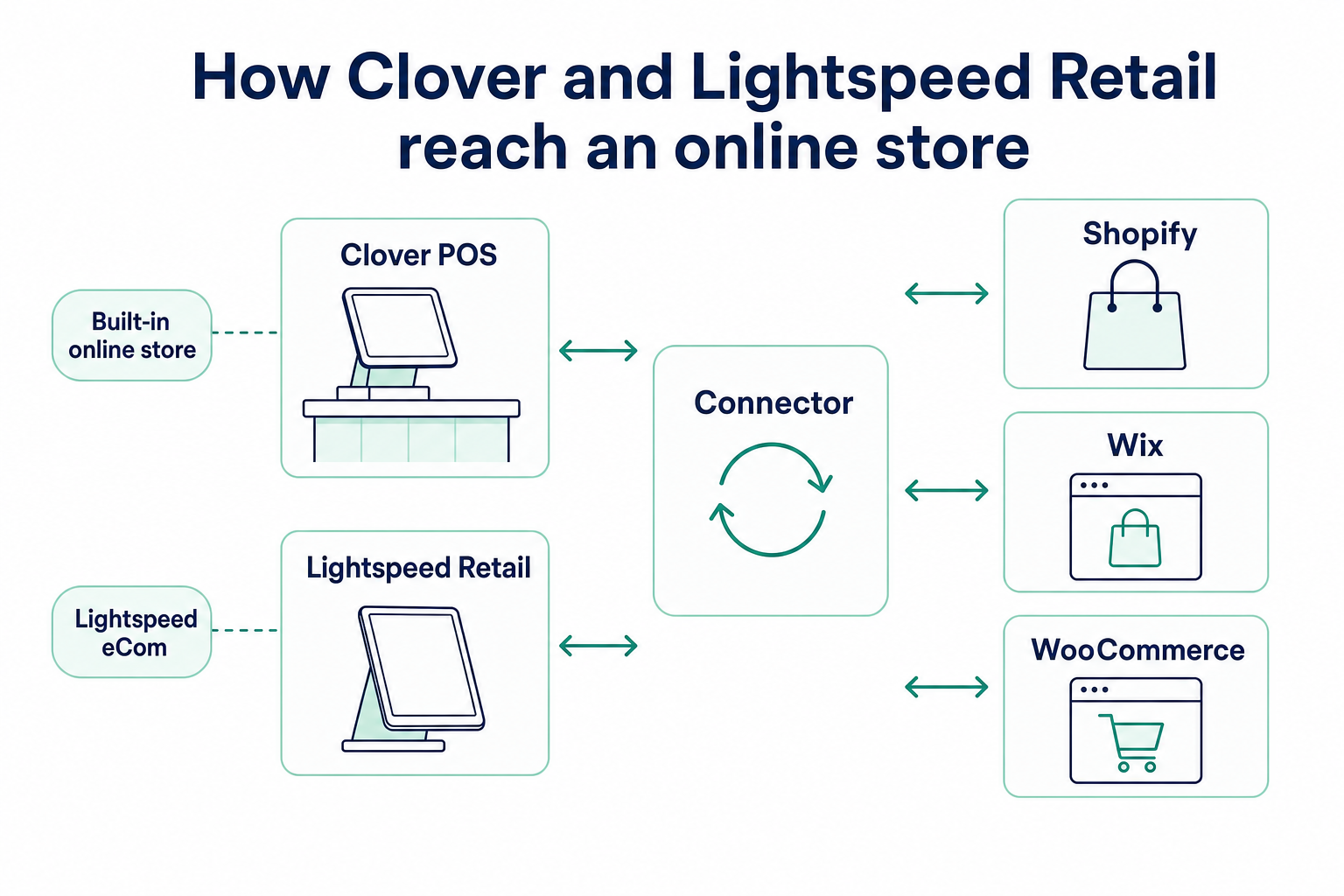
Confirm your exact pair before you sign with either POS vendor. The pair pages list what syncs, field by field, and which direction each field travels.
How much work is switching between Clover and Lightspeed?
Lightspeed says a migration may take a few days, and the slowest parts are loading accurate stock counts and replacing hardware. Plan for both before you set a launch date.
The steps below explain how to transfer your product catalog, update stock counts, prepare new hardware, and keep your online store connected during the switch.
1. Moving the product catalog
Start with an export from the current POS. In the Clover Dashboard, open Items, then Item list, and choose Export from the three-dot menu, as the Clover backup steps show.
Lightspeed R-Series exports a CSV from Inventory, then Item Search, following the R-Series backup steps. Reformat the columns to match the new system's import file. Keep option names identical so that "Size: M" maps to "Size: M." Shops moving into Clover can use its bulk inventory import.
2. Bringing stock counts across
Lightspeed's migration guide asks for an accurate count before go-live. If you keep selling between export and launch, import the items with quantities left out.
The day before launch, export updated stock counts and import them using a purchase order associated with a placeholder vendor. A 1,200-SKU gift shop could count on Sunday evening and open on Lightspeed Monday morning.
The table below provides a migration checklist for stores moving from Clover to Lightspeed Retail, covering the key tasks to complete before the new POS goes live.
Table 4: Stock counts and hardware take the most planning when a shop switches POS.
3. Hardware and staff changes
Clover devices run Clover software, so a move to Lightspeed means new devices plus a Lightspeed reader. Check how many months remain on any 36-month Clover term, and ask Clover or your reseller what ending it early costs.
Staff members need a brief training session on the new register before launch day. Schedule it for a quiet stretch, such as late January once holiday returns settle.
4. Keeping the online store live during the move
A connector can re-match products to the new POS by SKU or barcode, with product title as a fallback. Products that exist only online can be copied across with a push.
Which POS fits your store?
Match your shop to the closest profile below, then take the step listed beside it.
- Gift shop with 300 items and paid-off Clover hardware: Stay on Clover, and use the Retail Growth store or connect Shopify.
- Apparel boutique with 2,000 variants opening Shopify: Trial Lightspeed Retail and price the Shopify connection before you commit.
- Sporting goods store with two locations: Compare Lightspeed's multi-store tools with the cost of a second Clover package.
- Shop halfway through a Clover device term: Consider finishing the term, connecting your online store now, and revisiting your POS choice during the final quarter.
Lightspeed offers free trial accounts, according to its comparison page. On Clover, ask a sales rep or reseller for a demo on the exact device you plan to buy.
Our omnichannel retail POS guide shows how one stock count can serve the shelf and the website. Our pages for Clover and Lightspeed R-Series list the supported store pairs.
How can SKU IQ simplify inventory management for Clover and Lightspeed retailers?
After choosing between Clover and Lightspeed, make sure your in-store and online inventory stays accurate as sales come in. SKU IQ helps reduce manual stock adjustments, so your team can spend less time checking quantities across systems.
Retailers can use SKU IQ to:
- Reduce manual updates: Automatically reflect inventory changes across connected sales channels.
- Reduce overselling risks: Keep online stock availability aligned with inventory changes at the register.
- Manage product changes: Update supported product information without editing each connected platform separately.
- Simplify daily operations: Spend less time reconciling inventory records after a busy sales day.
You can review how SKU IQ works to understand the setup process before getting started.
Ready to simplify inventory management? Start your 14-day free trial and get a free setup call to help configure your connection.
Frequently asked questions about Clover vs Lightspeed
1. Is Clover or Lightspeed better for a small retail store?
Clover suits shops with a simple catalog that want hardware and payments in one package. Shops with thousands of variants or a regular purchase order routine get more from Lightspeed Retail. Check which online store each POS connects to before deciding.
2. Which costs less, Clover or Lightspeed?
Clover Standard software starts at $84.95 per month for one location, after an upfront hardware purchase of $1,899. Lightspeed Basic lists at $89 a month billed yearly with Lightspeed Payments, plus hardware. Processing rates change the total, so compare written quotes.
3. Does Lightspeed Retail include an online store?
Lightspeed eCom (E-Series) comes with current Lightspeed Retail plans at no extra charge, and Basic plans get a limited version. It syncs the POS catalog and supports buy online, pick up in store. X-Series shops should confirm their eCom options with Lightspeed.
4. Can Clover connect to Shopify?
Clover's payments plugin lets a Shopify store take card payments through a Clover account, and stock counts stay separate. For inventory, a connector such as SKU IQ links Clover on Retail Growth to Shopify and updates stock both ways.
5. Can I move my products from Clover to Lightspeed?
Export the item list from the Clover Dashboard, then reformat the columns for Lightspeed's import. Count stock first, and load quantities through a purchase-order import if sales continue. Lightspeed says migration may take a few days, so back up the Clover item list before you start.
6. Can I keep my Clover hardware if I switch to Lightspeed?
Clover hardware stays tied to Clover software and Clover-compatible processing. Switching to Lightspeed requires compatible hardware, such as an iPad or computer and a Lightspeed card reader. Check how many months remain on your Clover contract before switching. Ask Clover or your reseller what ending a term early costs.
7. What is the difference between Lightspeed R-Series and X-Series?
Both are Lightspeed Retail systems sold under one name. R-Series is the product long sold as Lightspeed Retail, and X-Series is the former Vend. Add-ons and connectors differ by series, and both versions work with SKU IQ.
Share this blog:





Sync and Manage Inventory Across Your Retail Systems
- No more spreadsheets or manual updates
- Real-time sync between POS and eCommerce
- One product catalog, every sales channel
- Save hours managing multiple systems

Ready to stop worrying about inventory?
Start a free trial and experience how much easier retail operations become when your systems stay in sync.