

Updated
November 13, 2026
Square vs Lightspeed: Which POS Fits Your Retail Store?
Square vs Lightspeed comes down to inventory complexity, pricing, and daily retail operations. Square suits smaller stores with basic stock tracking, while Lightspeed supports advanced inventory management, purchase orders, and serialized products. Both offer online selling options and Shopify inventory syncing through SKU IQ.


TL;DR
- Square Free suits small retailers with simple catalogs, while Square Plus adds purchase orders, vendor management, and stock transfers.
- Lightspeed supports complex inventory with matrix products, serialized stock, vendor ordering, and repair management.
- Square offers a free plan, while Lightspeed Retail starts at $89 monthly with annual billing.
- Both POS systems support multiple locations and online selling, but inventory capabilities and plan requirements differ.
- SKU IQ connects Square or Lightspeed with Shopify, syncing inventory counts in about three minutes on average.
A retail POS needs to do more than ring up sales. For a small shop, basic stock tracking may be enough. Stores handling hundreds of product variants, frequent supplier orders, or multiple locations often need more inventory tools.
Costs also influence the decision. According to the Federal Reserve Bank of New York, 67% of US retail firms surveyed reported tariff-related costs as a financial challenge in 2025. Paying for POS features your store rarely uses adds another expense.
This Square vs Lightspeed guide compares inventory features, pricing, payment processing fees, and online store integrations to help you choose a system that suits your retail operations.
Is Square or Lightspeed better for a retail store?
The better choice depends on how much inventory management and catalog work your store handles. A shop where the owner reorders products by checking shelf stock may prefer Square. A store ordering from a dozen vendors may benefit more from Lightspeed.
Square fits a micro-retailer with one location and simple products, since Square Free covers selling and basic stock tracking. Lightspeed fits a store that manages size runs and weekly purchase orders. Those tools are included in its entry-level retail POS plan.
Setting up Square Free costs nothing, and Lightspeed offers a free trial. Testing both systems with your own products can help you make the final decision.
What separates a micro-retailer from a more complex retail store?
Two factors help determine where your store fits. The first is how your products vary, and the second is how you restock them. A shop selling one version of each product and manually checking stock before reordering fits the micro-retailer category.
Take a gift shop run by its owner and one part-timer as an example. It sells about 600 products from one location, most in a single version, and takes roughly $9,000 per month in card sales.
Now compare an outdoor apparel and bike shop with two locations. It carries about 3,500 SKUs (stock-keeping units, with a unique code for each size or color variant) and orders from 12 vendors each week. Bikes arrive with serial numbers, and a repair bench sits at the back.
A store's inventory needs can change as the business grows. Opening a second location or placing larger supplier orders can make inventory management more complex.
The table lists the five signals to check against your own store:
Table 1: Five signals that show which side of the line your store sits on today.
Apparel stores land on the complex side early, because each style multiplies into sizes and colors. Our guide for clothing stores selling in person and online covers that catalog work.
How do Square and Lightspeed compare feature by feature?
Item setup and restocking show the biggest differences between the two systems. Locations and built-in websites differ in smaller ways.
1. Item setup and variants
Square keeps one shared item library, where each item can carry variations such as sizes. Edit an item once, and its name and variations appear at the register and on your Square website.
Lightspeed supports matrix products for size and color combinations, along with serialized inventory, per its comparison page. A jacket available in four sizes and three colors becomes one matrix containing 12 variants.
2. Stock counts, vendors, and purchase orders
On Square Free, stock tracking comes with low-stock alerts and spreadsheet exports. Purchase orders and vendor profiles arrive with Square Plus and Premium, alongside unit costs for margin reports.
Each Square purchase order can hold up to 500 unique items, per Square's purchase order guide. Lightspeed includes built-in purchase orders and custom reorder points. Its retail plans also offer PO Sync with NuORDER, Lightspeed's wholesale ordering network.
3. More than one location
Adding locations costs nothing extra on Square Free. Stock transfers between locations require Square Plus or Premium, with fees charged per active location.
Lightspeed includes one register on each plan and builds custom plans for multi-location stores through its sales team. Its comparison page says reporting and inventory work across all locations on every plan.
4. Built-in online store
A Square website draws from the same item library, so online orders lower the same stock count as counter sales. You choose which items appear online and at each store.
Lightspeed offers built-in eCommerce functionality, with basic features available on its Basic plan. Core and Plus include more extensive eCommerce capabilities.
5. Support and setup help
Square Support hours and availability vary by plan tier, per Square's plan guide. Lightspeed's retail plans list 24/7 chat and phone support, along with onboarding options.
The table below summarizes the main differences between Square and Lightspeed, including inventory tools, multi-location management, online selling, and customer support.
Table 2: Where Square and Lightspeed differ for a retail store, from each company's own pages.
What do Square and Lightspeed cost for a small retail store?
Two costs make up the monthly POS bill: the software subscription and card processing fees. Hardware is an additional expense for both systems.
Square Free has no monthly fee, while Square Plus costs $49 per active location. Square Premium costs $149 per location and offers a lower in-person processing rate.
Lightspeed Retail starts at $89 per month for Basic and reaches $289 for Plus, billed annually. Core costs $149 per month, while monthly billing adds $20 to $50 per plan. These prices assume Lightspeed Payments, and processing fees may vary by business type.
The comparison below shows how subscription fees, payment processing rates, and hardware costs differ between the two systems.
Table 3: Square vs Lightspeed pricing comparison for software plans, card processing fees, and hardware costs.
Consider the gift shop's payment processing costs on Square. At $9,000 in monthly in-person card sales across 300 transactions, the shop would pay $279 in processing fees on Square Free. That includes $234 in percentage fees and $45 in per-transaction fees.
Square Plus lowers the in-person rate by 0.1 percentage point, saving the shop $9 per month. The rate reduction covers the $49 subscription only when monthly card sales exceed $49,000. Below that amount, the additional features are the main reason to upgrade.
Lightspeed's processing costs depend on the quote your business receives. Request a written rate and compare it against the same $9,000 in monthly sales before selecting a plan.
When is Square the right POS for a micro-retailer?
Square suits micro-retailers that sell products with few variations and manage restocking manually. The free plan covers that shop, and Square Plus adds vendor tools once restocking turns into ordering.
1. Signs Square fits your store
Look for these signs in your own shop:
- One location: Your store sells from one counter, with occasional pop-ups or market days on a phone and card reader.
- Simple catalog: Most of your products come in one version, such as candles or packaged gifts.
- Shelf restocking: You reorder by walking the shelves and jotting down what ran low.
- Owner at the till: You or one helper rings up nearly every sale, so staff permissions stay simple.
Square stores that also sell online have a few plan requirements worth checking early. Inventory tracking needs to be on, and the plan must allow third-party apps.
2. When to move from Square Free to Square Plus
Square Plus becomes more useful when your store needs the following features:
- Vendor ordering: You send your first purchase orders and want vendor profiles attached to items.
- Margin tracking: You add unit costs to see cost of goods sold (COGS) and sell-through reports.
- Barcode labels: You print your own labels from the Square Dashboard or the POS app.
- Stock transfers: You open a second shop and need to move stock between the two.
The gift shop from earlier fits Square Free today. Once the shop starts placing regular monthly orders with its candle supplier, it may be worth considering Square Plus.
When does a more complex store need Lightspeed?
Lightspeed suits stores managing multiple size and color variants alongside weekly vendor orders. Repairs and special orders strengthen the case, since Lightspeed lists both as built into its POS.
1. Signs Lightspeed fits your store
These signs point toward Lightspeed:
- Size and color grids: Your best-selling products come in multiple variants, such as boots in eight sizes and two colors.
- Weekly vendor orders: You reorder from set vendors on a schedule and want reorder points to flag low stock.
- Serialized stock: You sell bikes or electronics that need a serial number on each unit.
- Service work: Your team takes repairs and special orders at the counter.
- Wholesale buying: You order from brands on NuORDER, which links to every Lightspeed Retail plan.
Lightspeed runs two retail platforms, Lightspeed X-Series and R-Series. The published retail prices reflect X-Series, so confirm which one a sales rep is quoting.
2. What to consider before choosing Lightspeed
Lightspeed charges a subscription fee from the start, so retailers should assess whether its inventory tools justify the cost. Yearly billing saves up to 18% in exchange for a longer commitment.
Feature availability also varies by plan. Ask which plan holds the tools on your list before you sign, since moving up a tier later raises the monthly fee.
How do Square and Lightspeed connect to Shopify or another online store?
Two routes exist: sell through the POS's own website, or keep a separate storefront and connect it to the POS. Stores already using Shopify or Wix typically take the second route.
A separate storefront means two catalogs, one in the POS and one online. Without a connection, retailers must manually add new products and update stock counts after each sale. This increases the risk of overselling.
The holiday season tests that link hardest, especially for clothing stores. Adobe expects US shoppers to spend $51.3 billion on apparel online this holiday season, up 4.7% from last year.
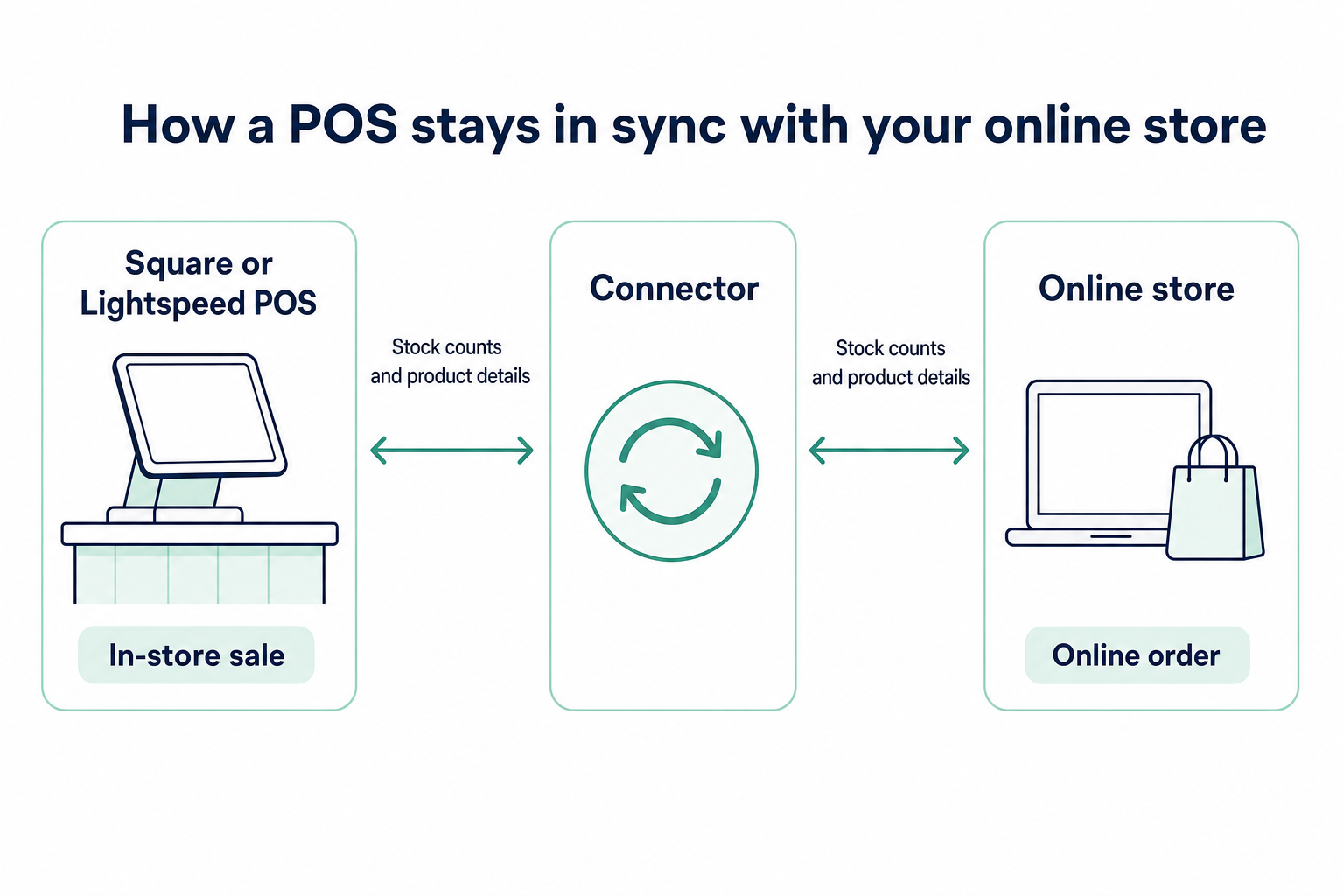
A connector such as SKU IQ links either POS to the online store, so a sale in one place lowers the count in the other. Square lists SKU IQ among the third-party inventory integrations on its inventory page.
Both Lightspeed platforms and Square connect to Shopify through SKU IQ. You can connect Square to Shopify or pair Lightspeed X-Series and Shopify, and stores with more than one location require a custom setup.
Lightspeed stores can follow our Lightspeed and Shopify setup guide for the steps. It covers linking products and checking counts after the first sales.
Which POS fits your store?
The right POS should support your current retail operations while accommodating expected growth over the next 12 months. Choosing features based on needs five years away could mean paying for tools you rarely use today.
A two-location shop with simple items can stay on Square Plus comfortably. A one-location bike shop with a repair bench may need Lightspeed from its first day.
Compare your store's inventory needs and daily operations with the options below to identify a suitable POS and the next step to take.
Table 4: Recommended POS options based on retail inventory needs and daily operations.
Switching from Square to Lightspeed later requires migrating your product catalog and retraining staff. Schedule the transition during a slower sales period to avoid disrupting peak-season operations.
Stores that also sell online face one more choice about which system holds the master catalog. With SKU IQ, you can choose which system acts as the source of truth, including your POS.
Before connecting, check your platform pair using the compatibility checker, which requires no sign-up. It shows what data syncs between your POS and online store.
How does SKU IQ support inventory syncing in Square vs Lightspeed?
SKU IQ syncs inventory between Square or Lightspeed and a connected online store, helping retailers keep stock counts consistent across sales channels. It also supports product matching, catalog updates, and multi-location configurations based on the selected plan.
Here's what SKU IQ offers beyond the built-in inventory features covered earlier:
- Product matching: The Link Report identifies matching products using SKUs or UPC barcodes, helping retailers find items that need attention.
- Inventory updates: Stock quantity changes sync in about three minutes on average, according to SKU IQ's documentation.
- Product information: The Plus plan supports syncing product titles and prices, reducing the need for separate catalog updates.
- Multiple locations: Additional locations require configuration with the SKU IQ team, with a $10 monthly charge per extra location.
Compare the SKU IQ pricing plans to see which features suit your retail operations, or start your 14-day free trial to test inventory syncing with your existing POS.
Frequently asked questions about Square vs Lightspeed
1. Is Square or Lightspeed better for a small retail store?
Square fits a one-location shop with simple items, because its free plan covers selling and basic stock tracking. Lightspeed fits stores with size and color runs or weekly vendor orders, since its retail plans build in those inventory tools.
2. Is Square free for a retail store?
Square Free has no monthly software subscription fee, but payment processing fees apply to card transactions: 2.6% + 15¢ in person and 3.3% + 30¢ online. Hardware costs extra, apart from a free magstripe reader. Purchase orders and stock transfers need Square Plus.
3. How much does Lightspeed Retail cost per month?
Lightspeed Retail starts at $89 per month for Basic, billed yearly, and reaches $289 for Plus. Monthly billing runs $109 to $339. Lightspeed quotes card rates and extra locations separately.
4. Which POS handles clothing sizes and colors better?
Both handle sizes through item variations in Square and matrix products in Lightspeed. Matrices suit deep grids, like boots in 16 size and color combinations. Square's variations suit a few versions per item, like a tee in three sizes.
5. Can Square run more than one store location?
Yes. Extra locations cost nothing on Square Free, and each one can take sales. Stock transfers between them need Square Plus or Premium, at $49 or $149 per active location each month.
6. Can I switch from Square to Lightspeed later?
You can, and the move centers on your catalog and your staff. Square products may need to be restructured in Lightspeed, with size and color variations organized into matrices. Unique SKUs on every variant speed up that rebuild.
7. Do Square and Lightspeed work with Shopify?
Both connect to Shopify through a connector app. The SKU IQ app links Square and both Lightspeed platforms with Shopify, syncing stock counts and, on Plus, product details like price. Each POS also offers a built-in online store.
Share this blog:







Sync and Manage Inventory Across Your Retail Systems
- No more spreadsheets or manual updates
- Real-time sync between POS and eCommerce
- One product catalog, every sales channel
- Save hours managing multiple systems

Ready to stop worrying about inventory?
Start a free trial and experience how much easier retail operations become when your systems stay in sync.