

Updated
November 9, 2026
SKU IQ vs Trunk: Inventory, Catalog, and Order Sync Compared
SKU IQ vs Trunk comes down to your sales channels and syncing needs. SKU IQ connects POS systems with online stores to sync inventory, product details, and orders. Trunk focuses on inventory syncing across marketplaces and supports bundles. Compare features, integrations, pricing, and use cases.


TL;DR
- The SKU IQ vs Trunk comparison shows that SKU IQ connects POS systems with online stores, while Trunk focuses on inventory synchronization across multiple marketplaces and sales channels.
- Both tools sync inventory counts, but SKU IQ averages three minutes per update, while Trunk processes order-driven stock changes in real time.
- SKU IQ supports product detail syncing, catalog transfers, and optional order syncing, while Trunk offers bundle and kit management through its Pro plan.
- SKU IQ supports Clover, Square, and Lightspeed integrations, making it suitable for physical retailers, while Trunk better serves marketplace sellers and online-only businesses.
- A 2025 Connected Commerce Council report found that 61% of small online sellers used marketplaces, reinforcing the need to choose an inventory tool based on sales channels.
Choosing between SKU IQ and Trunk depends on what your store needs to sync. Both tools keep inventory counts updated, but their capabilities differ. Trunk focuses on stock synchronization across multiple sales channels, while SKU IQ connects a POS system with an online store to sync inventory, product details, and orders.
The stakes are higher during peak shopping periods. Adobe forecasts that US online holiday sales will reach $275.1 billion in 2026, up 6.7% year over year.
This SKU IQ vs Trunk guide compares inventory syncing, supported integrations, product and order management, pricing, and which tool fits different retail setups.
Is SKU IQ or Trunk the better fit for your store?
The better fit depends on where your stock lives and how many places you sell it. A register paired with one website points toward SKU IQ, while selling across multiple marketplaces points toward Trunk.
Trunk suits sellers who list the same stock on several marketplaces and only need the counts to match. Physical retailers who manage their stores through a register such as Clover or Lightspeed get more from SKU IQ. It ties the online catalog to that register.
Both vendors offer a 14-day trial, so a short test on your own catalog settles close calls. First, check your platform pair on SKU IQ's compatibility checker.
What stock-sync job do SKU IQ and Trunk share?
Each tool links matching products across your systems and passes every stock change to the other side. The matching rules behind each link differ, and so does the timing.
The three areas below show how each tool matches products, updates stock counts, and handles initial setup.
1. How Trunk links your listings
Trunk builds its own central inventory from the listings in each connected channel. Listings that share a SKU (stock keeping unit, a product code you assign) are linked automatically, according to Trunk's FAQ.
The app tracks timestamped changes, so Trunk itself becomes the master record. Order-driven changes sync in real time, and manual edits can trail by seconds.
2. How SKU IQ links your products
The Link Report in SKU IQ reads both catalogs and matches items on SKU or UPC (the barcode number). Matching titles provide a third way to link products. You pick which pairs to link before any syncing starts.
You also choose the system that acts as the source of truth, and SKU IQ itself can fill that role. Stock changes reach the other side in about 3 minutes on average, depending on each platform's rate limits.
3. What both tools ask of you
Trunk says connecting takes a few minutes when SKUs already match. Inventory tracking must be enabled in both systems before SKU IQ can link items.
The trials run 14 days each. On the SKU IQ trial, linking and pushing stop at 50 items until you subscribe.
The table below compares SKU IQ and Trunk across syncing capabilities, product matching, supported platforms, pricing, and trial limits, based on vendor information.
Table 1: Both tools sync stock, and the scope around that job is where they part ways.
Where does the documented scope of SKU IQ and Trunk differ?
Product data and order records are the two biggest differences, followed by supported sales channels and bundles.
The following sections compare how SKU IQ and Trunk handle product catalogs, online orders, supported sales channels, and bundles.
1. Product catalog and listing content
Trunk leaves listing content alone by design, so titles and prices can differ on each channel. Only the SKUs need to match, which suits a seller who writes one Etsy listing and a different Shopify page for the same mug.
Copying a product from one side to the other is built into SKU IQ, which calls the step a push. A bulk push moves an entire catalog for a one-time fee, starting at $200 for up to 1,000 items.
On Plus, attribute sync passes edits to fields such as price and title. You set each field to sync one way or both ways.
2. Online orders and the POS record
Trunk reads each order to adjust stock counts. Its FAQ lists listing and order sync as in development.
Every SKU IQ plan shows online orders in a unified order view. Optional Order Sync copies paid Shopify orders into a supported POS for your records, one way, within up to 12 hours.
3. Sales channels and supported POS systems
Trunk connects about 20 platforms, most of them marketplaces and storefronts. Square is the only register on its supported list.
On the SKU IQ side, four POS systems connect to five ecommerce platforms, all shown on its supported integrations page. TikTok Shop through Shopify is also supported.
4. Bundles, kits and store locations
Trunk's Pro plan adds bundling and kitting, plus syncing for duplicate SKUs, per Trunk's pricing. Each bundle needs a fixed recipe and its own SKU, so a build-your-own box needs a SKU per combination.
SKU IQ supports multiple Square and Lightspeed locations through a custom multi-location setup. Each added location costs $10 per month.
The field-by-field view below covers Square and Shopify, a pair both tools connect.
Table 2: Trunk focuses on stock counts, and SKU IQ adds product data and order records.
How would each tool handle a busy Saturday at a Square and Shopify store?
Four events during a typical Saturday show where the tools' capabilities overlap and differ. Square runs the counter and Shopify the website, with products already linked.
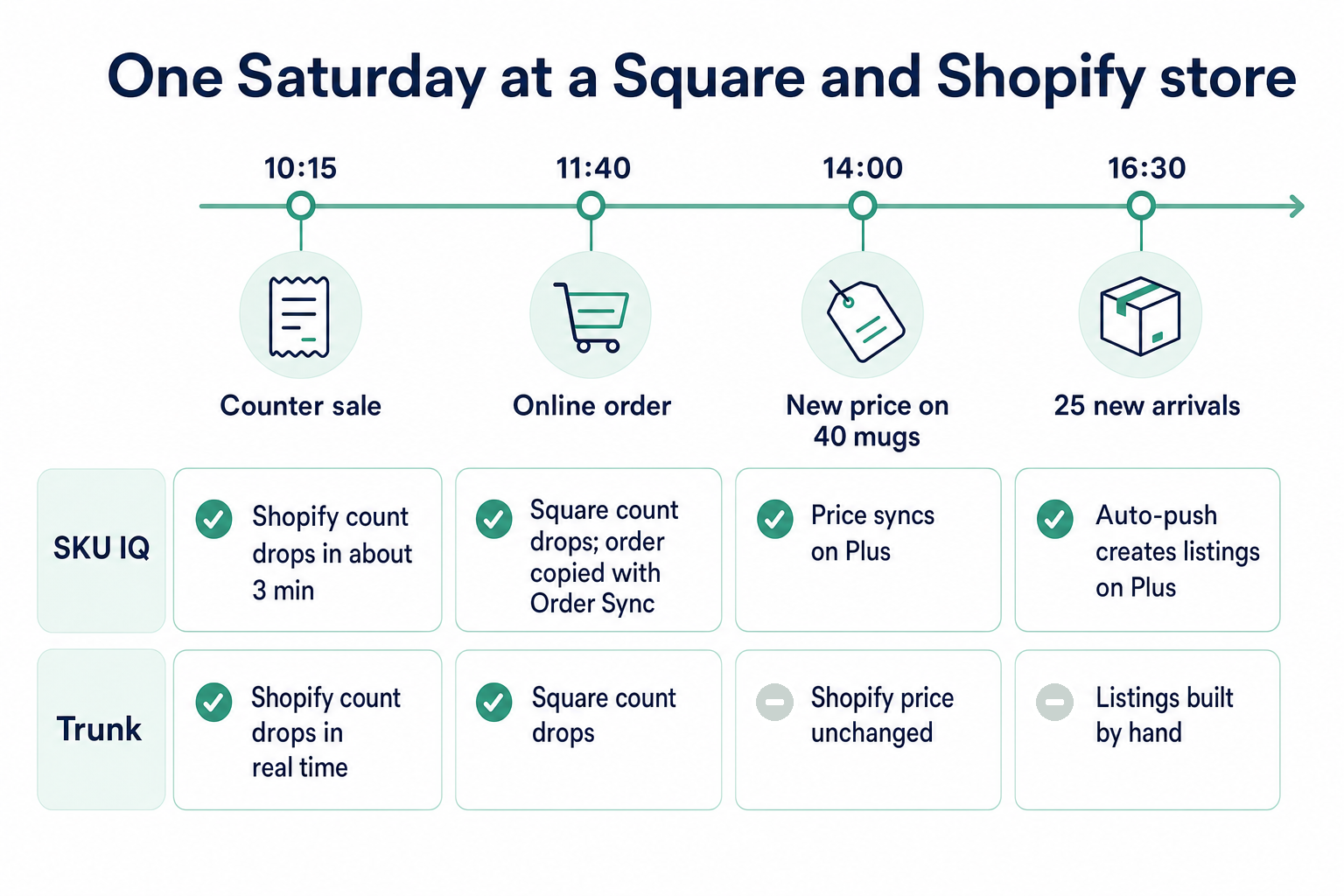
Here is what each tool does at each point:
- 10:15, counter sale on Square: Both tools lower the Shopify count, Trunk in real time and SKU IQ in about 3 minutes.
- 11:40, Shopify order for a candle set: Both tools lower the Square count. With Order Sync on, SKU IQ also copies the order into Square.
- 14:00, new price on 40 mugs in Square: Trunk leaves the Shopify price alone. On SKU IQ Plus, price sync carries the new price to Shopify.
- 16:30, 25 new arrivals entered in Square: With Trunk, each listing gets built in Shopify by hand. Auto-push on SKU IQ Plus creates them once Support turns it on.
The first two events are the shared job, and both tools handle them. The last two highlight differences in functionality that affect how much manual data entry your store requires.
Stores that write channel-specific listings on purpose lean toward Trunk. Stores that treat Square as the master catalog lean toward SKU IQ.
The Square and Shopify sync page lists every supported field and its direction. Quantities sync both ways, while tags and unit cost stay put.
Linking suits products already on both sides. Pushing items across suits stock that lives in Square only, such as a fresh delivery still missing online.
Linked products need the same structure on both sides. A tee sold in three sizes needs those three variants in Square and in Shopify.
How much do SKU IQ and Trunk cost for a small retail store?
Trunk charges by monthly orders, and SKU IQ charges by plan features. The pricing models differ more as order volume increases.
Trunk's Essential plan starts at $35 per month for up to 100 orders and climbs through eight tiers. According to Trunk's pricing page, Pro costs $4 to $50 more per tier.
SKU IQ's plans run from $19 to $99 per month, with unlimited linked items on each. The plan price holds steady as order volume rises.
The table compares four plans across three monthly order volumes a small store might experience.
Table 3: Listed monthly USD prices. Trunk rises with order volume, and SKU IQ stays flat by plan.
Basic covers stock sync and the order view. Attribute sync and auto-push cost $15 each on Basic and come included on Plus.
Seasonal changes in order volume affect Trunk's monthly charges. A store at 180 orders that reaches 350 in December moves from $45 to $59 on Essential.
Extras differ too. Added locations cost $10 per month each on SKU IQ, while Trunk includes unlimited channels.
Who should choose Trunk instead of SKU IQ?
Marketplace sellers and bundle builders are the two clearest cases for Trunk. Two more store types follow, each matched to a documented Trunk feature.
The following four store types can benefit from Trunk's multichannel inventory syncing and specialized features.
1. Sellers whose stock lives on marketplaces
Small online sellers rely heavily on marketplaces. In a 2025 report from the Connected Commerce Council, 61% of small online sellers used marketplaces, with four at once on average.
Trunk links marketplaces such as Etsy and Faire to your storefront. It also handles their quirks, like the extra step Etsy needs when a listing sells out. SKU IQ's integrations focus on connecting a register with an online store.
2. Shops built around bundles and gift sets
Trunk Pro tracks the parts inside each bundle, so a sold gift box lowers the count of each candle and card in it. Single-channel shops benefit too, since Trunk keeps bundles in sync inside one Shopify store, per its Shopify App Store listing.
3. Online-only brands with several Shopify stores
One Trunk subscription covers any number of Shopify stores. Every SKU IQ connection requires a POS system, so a seller with no register gains little from it.
4. Teams that track stock in QuickBooks Online or Xero
Trunk lists both accounting tools as channels, so counts can sync with your books. Stock changes made by other integrations get picked up as well. Accounting tools sit outside SKU IQ's integration list, which covers POS and ecommerce platforms.
A store matching one of these profiles should start with Trunk's 14-day trial. Stores run from a register will find the next section closer to home. Our guide to Trunk alternatives for physical retailers covers the wider shortlist.
Which tool fits your store's setup?
The table below matches common retail setups with the better-fitting sync tool and a practical first step to test it.
Table 4: Match your setup to the tool that covers it, then test on a few products first.
SKU IQ is generally the better fit for Clover and Lightspeed stores. Square stores have a real choice, and catalog work decides it.
Run one sync tool at a time. Two tools writing stock counts to the same store will overwrite each other's changes.
SKU IQ's trial includes a free one-on-one setup call, where a specialist walks through linking with you. Book it before linking the full catalog.
Square stores can check plan requirements on the Square support page. Your Square plan needs inventory tracking and third-party app access.
Plan the test for a quiet weekday, when fewer sales move the counts. Any mismatch is then easier to trace to a specific sale.
Ready to choose SKU IQ in the SKU IQ vs Trunk comparison?
The SKU IQ vs Trunk comparison comes down to how your business operates. If your physical store is the center of your retail operations, SKU IQ lets you keep your existing POS and online storefront without switching platforms.
Before committing, test the connection with products you sell regularly. Check whether inventory updates appear correctly after in-store and online sales, and confirm that your chosen setup meets your daily needs.
You can also get help from a SKU IQ setup specialist if you need guidance connecting your platforms.
Start your 14-day free trial and see whether SKU IQ is the right fit for your store.
Frequently asked questions about SKU IQ vs Trunk
1. What is the main difference between SKU IQ and Trunk?
Trunk syncs stock levels across many channels and leaves listing content separate on each one. Stock sync in SKU IQ runs between a POS and an online store. The app can also carry product details and order records between them.
2. Does Trunk sync products or orders?
Trunk's sync covers stock levels only, and its FAQ lists listing and order sync as in development. Titles and prices stay separate on each channel by design.
3. Does Trunk work with Clover or Lightspeed?
Trunk's supported list names Square as its only POS. Clover and Lightspeed stores can connect to Shopify or Wix through SKU IQ, which supports both Lightspeed R-Series and X-Series alongside Clover.
4. Which is cheaper, SKU IQ or Trunk?
At 100 orders per month or fewer, SKU IQ Basic costs $19 and Trunk Essential costs $35. Trunk rises with order volume, so the difference grows in busy months. Price sync and auto-push come with SKU IQ Plus at $49.
5. Can SKU IQ sync with Etsy or Amazon?
Current SKU IQ integrations connect POS systems to online stores, plus TikTok Shop with Shopify. Etsy and Amazon appear on Trunk's list of supported channels. Marketplace-first sellers will find a closer fit in Trunk.
6. Can I run SKU IQ and Trunk at the same time?
Running both tools on the same products can cause conflicting inventory counts, since each tool writes stock changes. Pause one before linking products in the other, then cancel the unused subscription once you've verified the test sales.
7. How fast does each tool sync stock?
Trunk says order-driven stock changes sync in real time, with manual edits a few seconds behind. On SKU IQ, a stock change takes about 3 minutes on average, depending on each platform's rate limits.
Share this blog:







Sync and Manage Inventory Across Your Retail Systems
- No more spreadsheets or manual updates
- Real-time sync between POS and eCommerce
- One product catalog, every sales channel
- Save hours managing multiple systems

Ready to stop worrying about inventory?
Start a free trial and experience how much easier retail operations become when your systems stay in sync.