

Updated
November 24, 2026
Black Friday Inventory Management Checklist: Store + Online
Follow this Black Friday inventory management checklist to prepare your store for the holiday rush. It covers SKU cleanup, inventory syncing, stock counts, live monitoring, and post-holiday returns, along with how SKU IQ helps prevent overselling across in-store and online channels.


TL;DR
- Black Friday falls on November 27, 2026. Prioritize SKU cleanup, inventory syncing, and stock checks now to reduce overselling risks during the holiday rush.
- Adobe forecasts $12.9 billion in U.S. online spending on Black Friday, highlighting the importance of accurate inventory tracking across physical stores and online channels.
- Match product SKUs across your POS and online store, test inventory syncing, and reserve two or three units of popular products to reduce overselling risks.
- Complete an inventory count before Black Friday, monitor best-selling products hourly throughout the weekend, and reconcile stock after Cyber Monday.
- SKU IQ helps retailers maintain accurate stock counts across their POS and online stores through automated inventory syncing, product linking, and multi-location support. New pricing introduced this August cut plan prices by up to 50%.
Black Friday inventory management becomes more challenging when your store sells both in-person and online. Your register and website need accurate stock counts to prevent overselling, canceled orders, and disappointed customers during the holiday rush.
According to the NRF's 2026 holiday survey, 64% of shoppers plan to do most of their holiday shopping over Thanksgiving weekend. With sales concentrated in just a few days, even small inventory discrepancies can affect customer orders.
This guide provides a step-by-step Black Friday inventory management checklist for 2026, covering SKU cleanup, stock syncing, inventory counts, live monitoring, and post-holiday returns.
What does Black Friday inventory management involve for a store that sells in two places?
It means running one stock count for two checkouts. Each product needs a matching record in the POS and the online store. Sales then have to reach the other system before the next shopper buys.
Separate records create the oversell risk, because a counter sale only reaches the website when something carries it across. Adobe expects $12.9 billion in U.S. online spending on Black Friday, up 9.2% year over year.
Phones add pressure too, with Adobe expecting a record 63% of Thanksgiving Day online spend on mobile. Quick phone purchases leave little time for a manual update, so connected retail setups pass each sale across automatically.
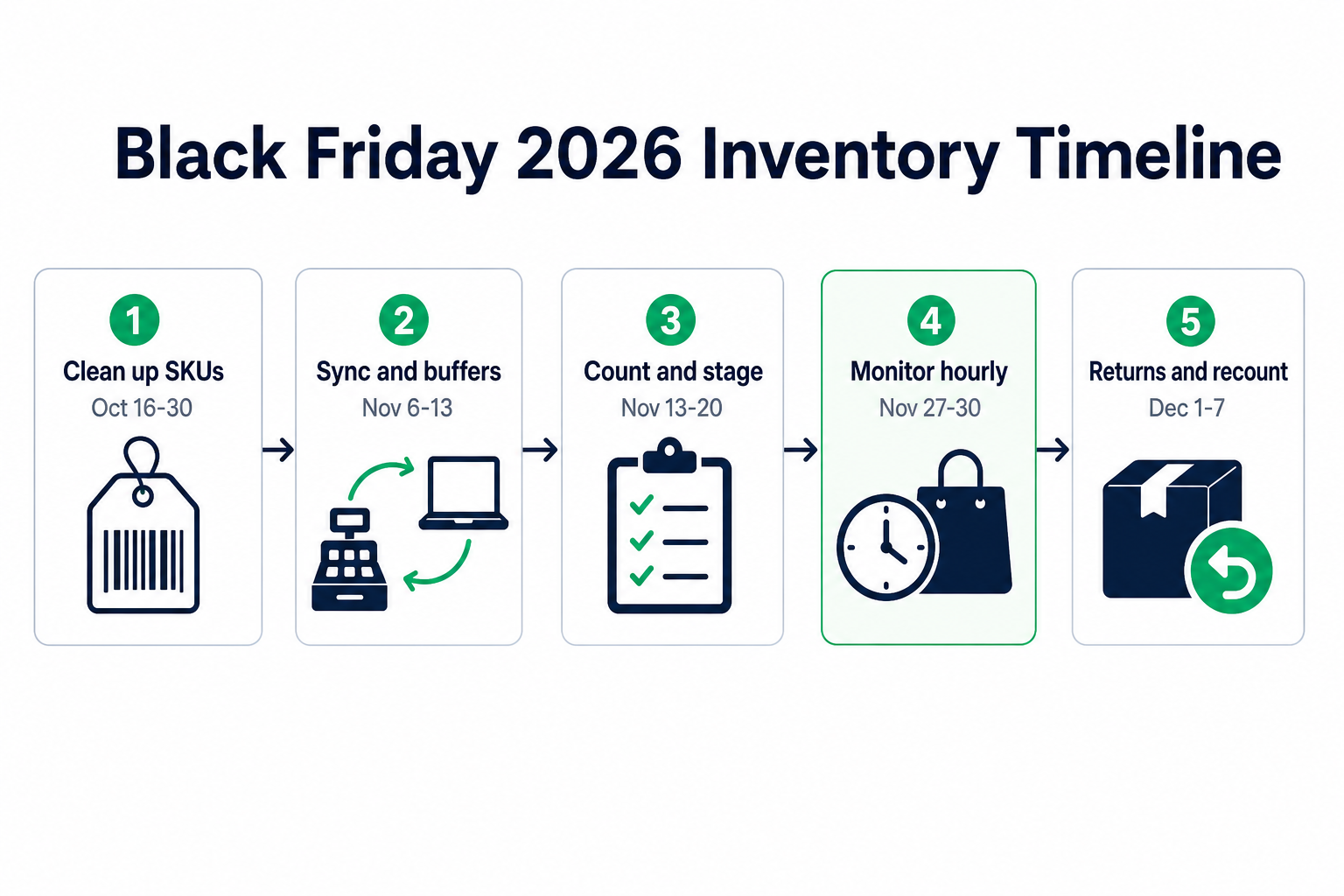
How do you clean up SKUs and product data four to six weeks out?
Clean data comes first, because every later step relies on records that match across systems. The work runs in three parts, starting with SKU codes.
1. Give each product one SKU in every system
Matching codes let software pair records without guesswork. Marketplace listings on Etsy or Amazon should use the same SKUs as the corresponding products in your POS and online store.
Variants count separately, so a scarf in cream and charcoal needs two SKUs on each side. Consistent SKUs also make it easier to process returns, track individual products, and maintain accurate inventory records over time.
Connector tools such as SKU IQ's Link Report pair records based on matching SKUs, UPCs, or exact product titles when both systems share the same variant structure.
2. Check for duplicate product listings
Duplicate product records can create confusion when syncing inventory between your POS and online store. Review your catalogs for products listed more than once under different SKUs or titles.
Before linking products, identify the correct records and resolve any duplicates. This helps prevent mismatched inventory counts and keeps product data consistent across both systems.
3. Hide slow sellers and discontinued items from sale pages
Homepage slots and sale collections should go to the items that turn fastest, so pull discontinued lines and slow movers first. Products made to order, such as custom furniture, are best left unlinked with tracking turned off. The help center article on linking every product explains why a linked custom item drops to zero after one sale.
How do you set up stock syncing and safety buffers two to three weeks out?
Connect your systems first, then protect the last few units of each hot item with a reserve. Prioritize your best-selling products and test inventory syncing before Black Friday.
Follow these four steps to keep stock counts accurate across your store and website before Black Friday.
1. Confirm how fast a sale reaches the other channel
Ring up a counter sale and watch the clock until the website updates. On various platforms, hourly batch updates leave a 60-minute window where the website keeps selling a unit already sold.
Stock changes reach the other system in about three minutes on average with SKU IQ. Peak traffic can stretch the normal queue to about 20 minutes. Priority Sync usually updates stock counts within 10 seconds, or about five minutes at peak, and it comes with the Pro plan.
2. Set aside a reserve for doorbusters
Move two or three units of each doorbuster into a labeled reserve bin, then subtract them from the POS count. Linked products sync that lower stock count to the website as well, so both channels sell down to the same floor.
Adobe expects online sales of clothing basics to jump 210% during Cyber Week against September levels, so apparel stores may want a larger reserve. Add the units back on Sunday night, or use them to cover a miscount.
3. Switch off continue selling when out of stock
Most ecommerce and POS platforms have settings that allow sales to continue when inventory reaches zero. Check these settings across every connected system and disable backorders or overselling for promoted products and their variants. Leaving this feature enabled on even one platform can lead to overselling despite accurate inventory syncing.
In Shopify, the Continue selling when out of stock setting allows orders when inventory reaches zero. Turn it off for every promoted product and its variants.
WooCommerce has a similar Allow backorders field, which should be set to "Do not allow" for the same items. Check your POS settings as well to ensure both systems stop selling when stock runs out. Our Shopify inventory guide covers tracking settings in depth.
4. Run a five-sale test
Pick five low-value items and put each through one real transaction before the sale. Keep the finished log handy for Black Friday morning.
Log every result against the five tests below, with what to do and what a pass looks like.
*SKU IQ does not sync return or refund operations between platforms. It only syncs the inventory increase when a returned unit is added back to stock.
Table 1: Five test transactions that confirm your sync before Black Friday.
How should you prepare the store floor and back room one to two weeks out?
This week's preparation ensures that the stock counts on screen match the physical inventory in the back room. A full count comes first, followed by staging and a hardware check.
1. Count every shelf and storage area
Check every location where stock is stored using a printed inventory sheet, including window displays and any offsite storage unit. Correct the POS count first and let the sync update the corresponding online stock count.
Schedule the count for a quiet morning, before the doors open. Stores that run cycle counts through the fall can focus on their top 50 items.
2. Stage online orders apart from the sales floor
Give online orders their own packing table and a shelf of tagged bins for pickup. Once an online order lands, move the item to that shelf right away so floor staff leave it alone. Train staff to treat this shelf as reserved for online orders and never take items from it for in-store sales, even during busy periods.
3. Test the hardware used to process sales and ship orders
Ring up one test sale on every register before the weekend.
Then check these four devices, one at a time:
- Barcode scanners: Scan one item from each department and confirm the right variant appears.
- Receipt printers: Print a test receipt and keep spare paper rolls at the counter.
- Card readers: Run a $1 test payment, then refund it.
- Shipping scale and label printer: Weigh one boxed order and print its label.
4. Avoid major catalog edits just before Black Friday
Finalize prices and promotions before Black Friday, and avoid major catalog changes through Cyber Monday. Bulk edits create a burst of sync events, and SKU IQ slows an account after 10,000 sync requests in one hour. Queued changes still go through at a slower pace, so make any remaining price updates in smaller batches.
What should you watch during Black Friday weekend?
Monitor sell-through rates for your best-selling products every hour, and act before a channel runs dry. Three habits cover the weekend:
1. Track sell-through every hour
Sell-through is units sold divided by units on hand at opening. If 12 of 20 knit beanies sell by 11 a.m., that's 60% in two hours, and the reserve bin will be needed by lunch.
Compare the POS sales report with your online admin each hour. Setting a phone alarm keeps the check on schedule when the line reaches the door.
2. Move stock to the channel that needs it
One shared count lets both channels draw from the same pile, so a single-location store reallocates automatically. Shops with two locations can move units to the website's linked store before Cyber Monday.
Multi-location options in SKU IQ, available for Square and Lightspeed, cover a one-location link or manual routing per online order. Both appear in the multi-location setups guide.
3. Handle an oversell within the hour
Call or email the customer before they ask, and offer a close substitute or a full refund. Correct the stock count in the POS afterward, then check which link or setting allowed the extra order to go through.
Common causes appear in our guide to preventing overselling, and a short note on each case helps the post-weekend review.
How do you handle returns and reconciliation after Cyber Monday?
Inspect each return before it goes back into stock, then reconcile counts once the weekend ends. Retailers expected 17% of holiday sales to be returned in 2025, according to the NRF and Happy Returns report. Plan one return bin at the counter and a second for online returns arriving by mail.
Restock a returned item in the system where the refund was processed, and the linked count updates the other channel. Units returned in sellable condition by Sunday night can go straight into Cyber Monday stock.
Run a second full count in the first week of December and compare it with both systems. Record which items sold out first and when, since that list becomes next year's buying plan.
How does SKU IQ keep your store and website on one count?
SKU IQ connects the POS you already use with your online store, so a sale on either side updates the other.
Our new pricing, introduced this August, reduced plan prices by up to 50%, the lowest SKU IQ has ever offered. That puts stock sync within reach from $19 a month, and Priority Sync for peak-traffic weekends on Pro at $99 a month, all in place well before Black Friday.
The following five features support the steps outlined in this checklist:
- Link Report: pairs existing products by SKU or UPC before the rush
- Push: copies items that exist in only one system to the other
- Stock sync: unlimited linked items on every plan, from Basic at $19 a month
- Priority Sync: included on Pro at $99 a month, 50% off for your first three months this Black Friday
- Multi-location: $10 per added location, configured by Support
Every supported register and online store pair appears on the integrations page, with plan details on the pricing page. Your 14-day trial opens every feature and links up to 50 items, plus an optional free one-on-one setup call.
Link your top sellers this week and head into Black Friday with one count. Start your free trial.
Frequently asked questions about Black Friday inventory management
1. How much stock should a small store order for Black Friday?
Base your stock requirements on last year's Thanksgiving weekend sales and current inventory levels. With Black Friday approaching, focus on your best-selling products and check whether suppliers can deliver additional units in time. Avoid overordering products that may not arrive before the sale.
2. Does SKU IQ work with a Wix store?
Yes. Wix stores connect with Clover or Square registers through SKU IQ, and Lightspeed R-Series and X-Series connect too. Each integration page lists the product fields that sync between the two systems.
3. Can I keep selling at the register while SKU IQ sets up?
Yes. Sales continue at the register while SKU IQ builds its Link Report, and both catalogs stay unchanged until you confirm each match. Onboarding can take only minutes for a well-organized catalog.
4. What should I do with the stock left over after Black Friday?
Bundle slow-moving leftover products into January gift sets or move them to a clearance collection. Track which lines remain on December 31, and lower next year's order for those items before you place it.
5. Can I run different Black Friday prices online and in store?
Yes, if price sync runs one way or stays off. Sync direction is set field by field in SKU IQ, so online-only sale prices can stay on the website while the register keeps regular prices.
Share this blog:







Sync and Manage Inventory Across Your Retail Systems
- No more spreadsheets or manual updates
- Real-time sync between POS and eCommerce
- One product catalog, every sales channel
- Save hours managing multiple systems

Ready to stop worrying about inventory?
Start a free trial and experience how much easier retail operations become when your systems stay in sync.