

Updated
October 27, 2026
Connected Retail for Small Stores: Unify In-Store and Online Without Replacing Your POS
Connected retail synchronizes point-of-sale systems with online storefronts in real time. SKU IQ connects supported POS and eCommerce platforms, helping retailers sync inventory in real time, link matching products, migrate catalogs, reduce duplicate data entry, and keep inventory aligned across channels.

.png)
TL;DR
- Small retailers need shared inventory data between checkout counters and online shops.
- Connected retail links existing registers to digital storefronts using lightweight software.
- Real-time synchronization updates product availability immediately after each purchase.
- Attribute rules let the register govern prices while the website manages rich images.
- SKU IQ connects supported POS and eCommerce platforms without requiring new hardware.
Large enterprise brands often use custom software to manage complex retail operations. Small retailers need simpler ways to connect the systems they already use.
Online sales make that connection increasingly important. US retail eCommerce sales reached $340.2 billion in Q2 2026, up 12.2% year over year, according to the US Census Bureau.
Adding a Shopify or Wix storefront can expand a retailer’s reach. Separate point of sale (POS) and eCommerce systems, however, can create duplicate work and outdated inventory quantities.
Connected retail links these systems so inventory and product information stay aligned across sales channels. Retailers can keep their existing store technology while managing online and in-store sales efficiently.
This guide covers how connected retail works and common operational challenges. You’ll also learn how to connect your systems and how SKU IQ helps sync inventory across supported POS and eCommerce platforms.
Defining Connected Retail for Small Businesses
Connected retail depends on how data moves between registers and web stores. Software connections link existing checkout terminals with digital commerce channels.
In-store and online shoppers purchase from the same inventory pool. A sale on either channel updates the available quantity.
Software listeners detect completed transactions on the register. The system transmits that count adjustment to the eCommerce platform in seconds.
Online purchases trigger the reverse process. The software adjusts on-hand counts on the POS before staff fulfill the order.
Product information remains consistent across channels. Staff update a price once at the register, and the change reflects online.
Contrasting Connected Retail with Enterprise Programs
Small-store connected retail differs from enterprise programs in cost, complexity, and hardware requirements. Enterprise initiatives often involve larger technology investments and custom development.
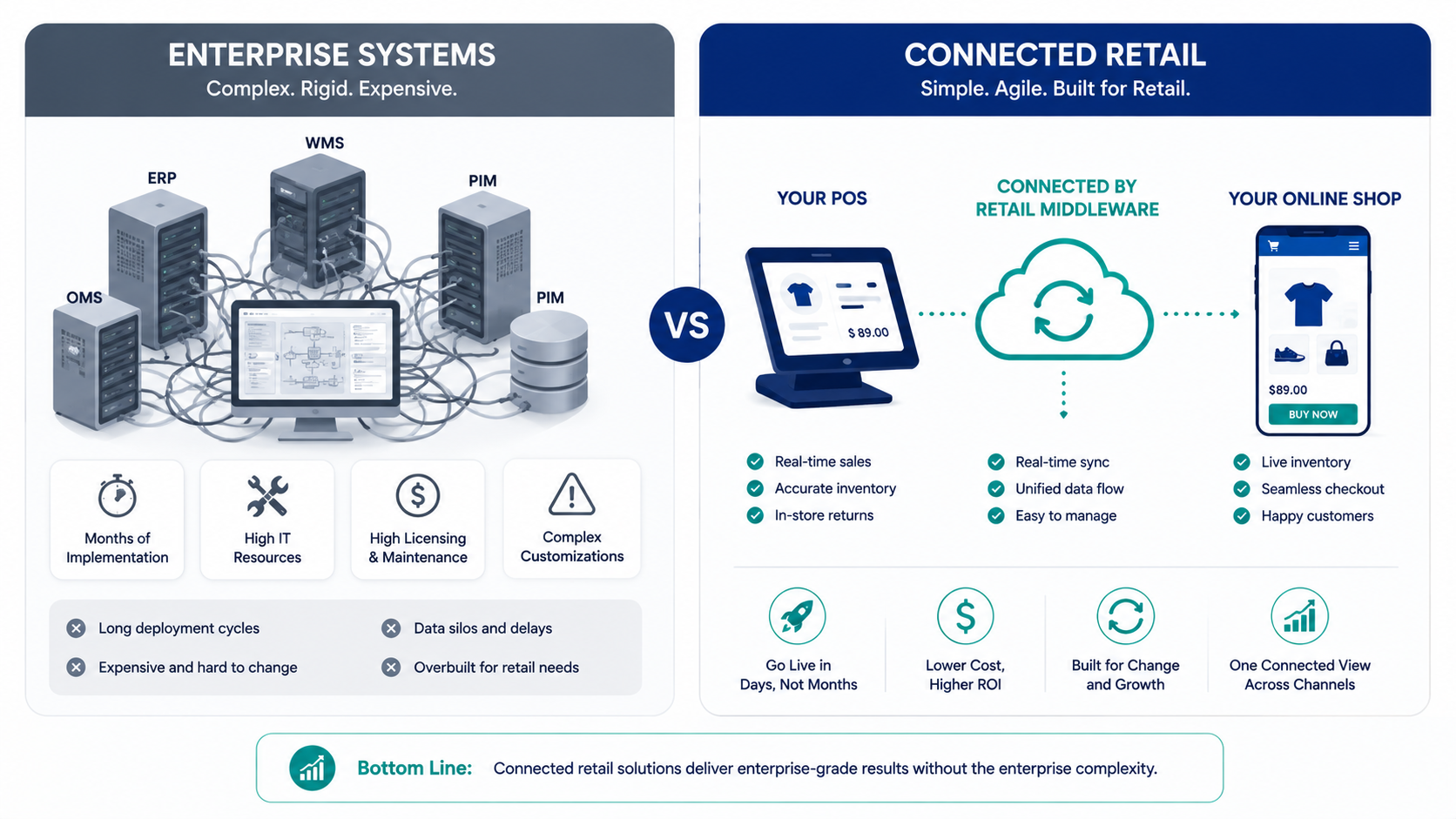
Enterprise brands replace entire hardware setups across dozens of locations. Small retailers preserve their existing Clover, Square, or Lightspeed registers.
Corporate rollouts require dedicated IT teams and extensive staff workshops. Connected retail tools install in minutes through standard app marketplaces.
Independent stores focus on immediate operational accuracy. Shared stock records prevent overselling and eliminate duplicate catalog maintenance.
Operational Pillars of Connected Operations
Connected retail relies on several mechanisms that keep data moving between systems. These include eCommerce inventory synchronization, catalog transfers, attribute rules, and order feeds.
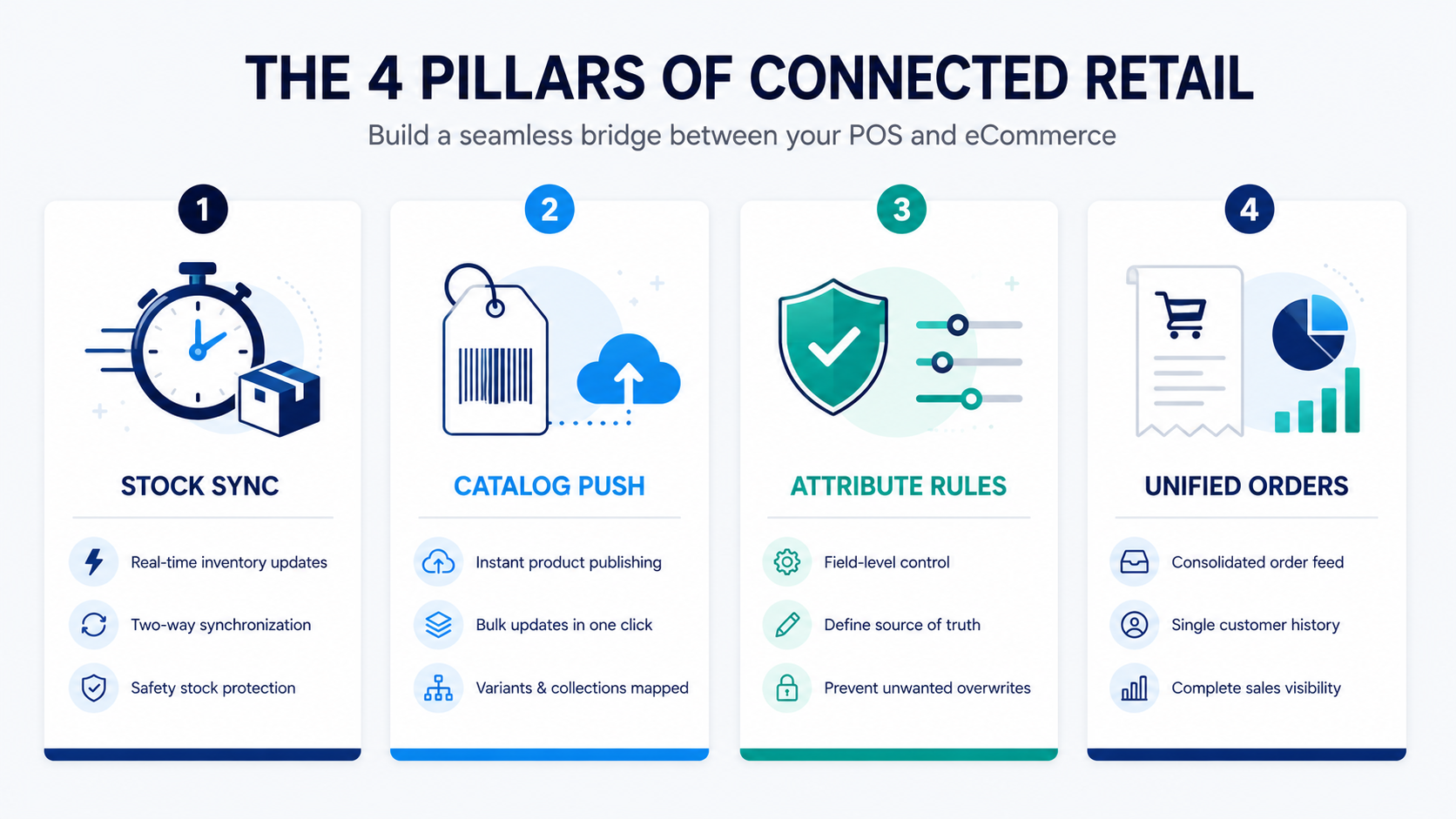
Real-time synchronization sends stock changes between connected systems after a sale. This helps keep product availability aligned across channels.
Bulk catalog tools move inventory records directly to your website. Staff transfer hundreds of items with starting quantities in a single step.
Attribute ownership rules designate which system controls specific fields. The register manages retail prices and barcode numbers.
The website retains full authority over search descriptions and photography. This separation keeps product pages optimized without risk of overwrites.
Unified transaction feeds route web sales into the POS register log. Store owners review total daily revenue within one central report.
Managing Multi-Channel Retail Friction
Operating across store counters and digital channels introduces inventory mismatches and variant sync errors. Addressing these issues requires systematic data standards and clear system rules.
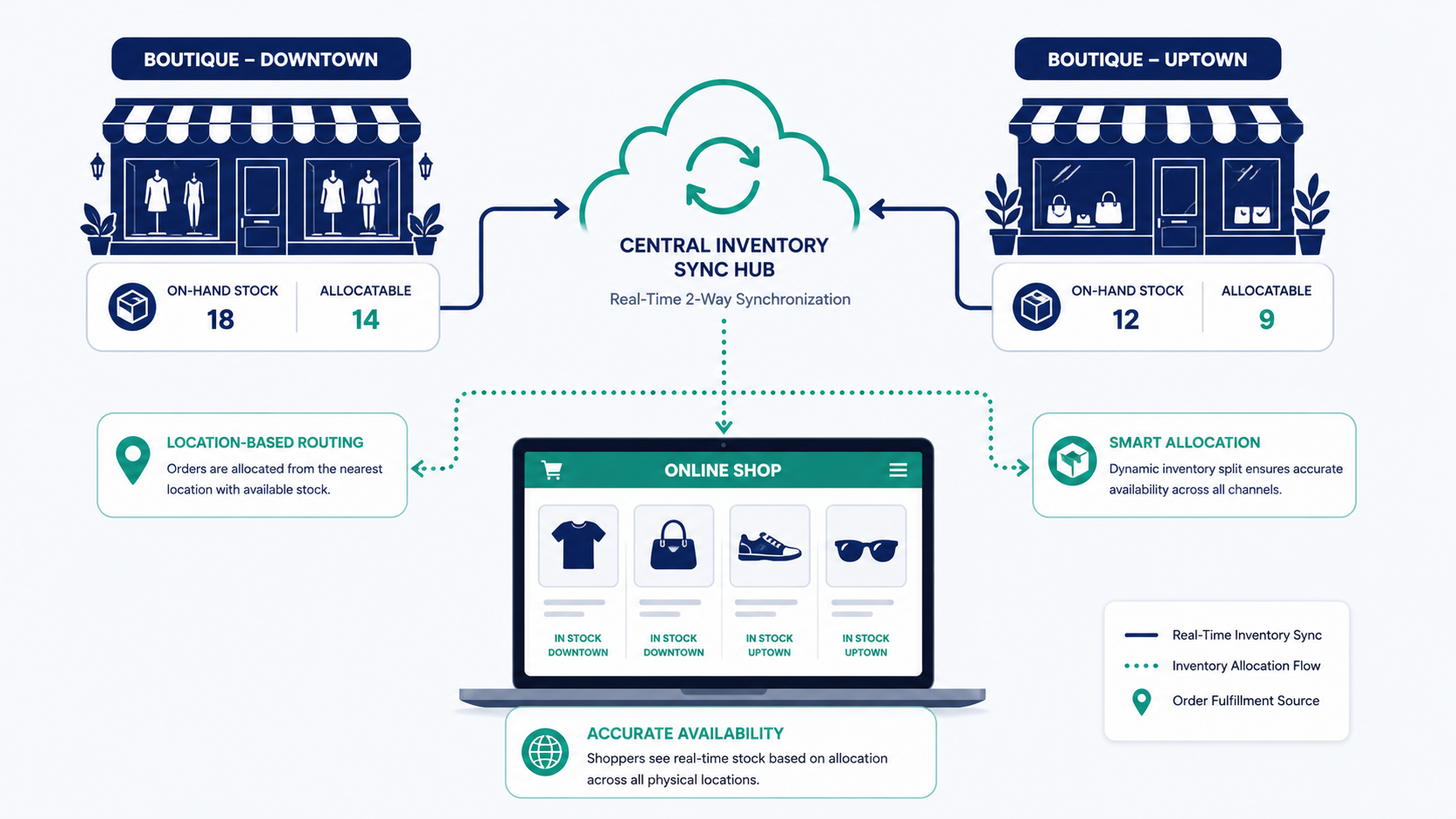
Location confusion occurs when aggregate quantities mask single-store stockouts. Retailers solve this by mapping location-specific stock to local customer pickup options.
Mismatched SKU codes cause duplicate product records across databases. Establishing consistent barcode standards on all variants keeps records aligned.
Separate pricing entries create conflicting in-store and online charges. Designating the POS as the master pricing record resolves customer disputes.
Store network interruptions prevent immediate communication with web servers. Reliable middleware queues offline transactions and syncs data when connections are restored.
Connecting Your Store in Five Steps
Connecting your POS and online store starts with clean product data and compatible platforms. Follow these five steps to establish and test the connection.
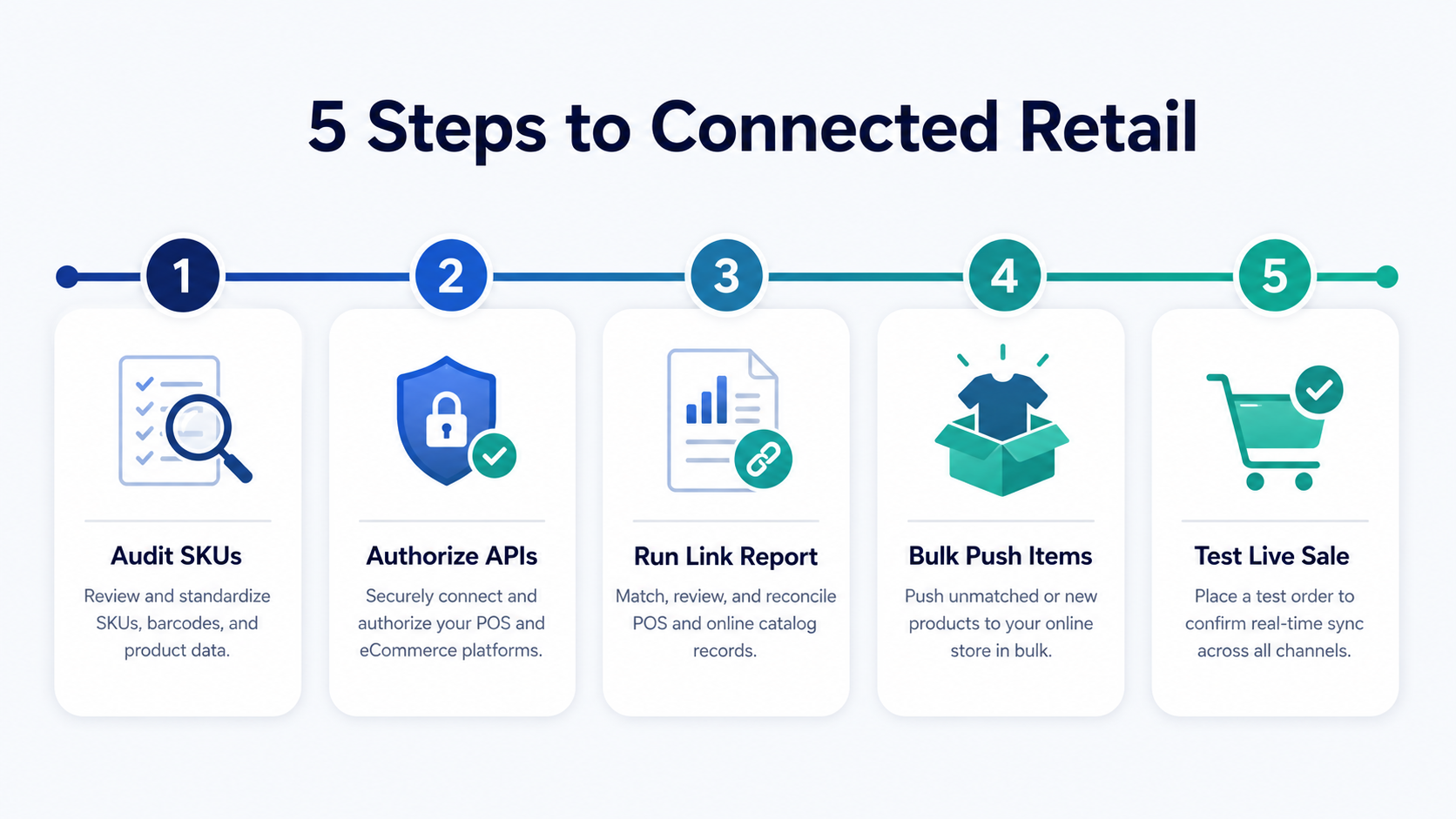
Step 1: Audit your product database. Confirm that every parent item and child variant carries a unique SKU or barcode.
Step 2: Authorize platform connections within your middleware account. Connect your Clover, Square, or Lightspeed system with your Shopify or Wix store.
Step 3: Run the automated link report to pair matching products. Select which platform holds the accurate starting inventory quantity.
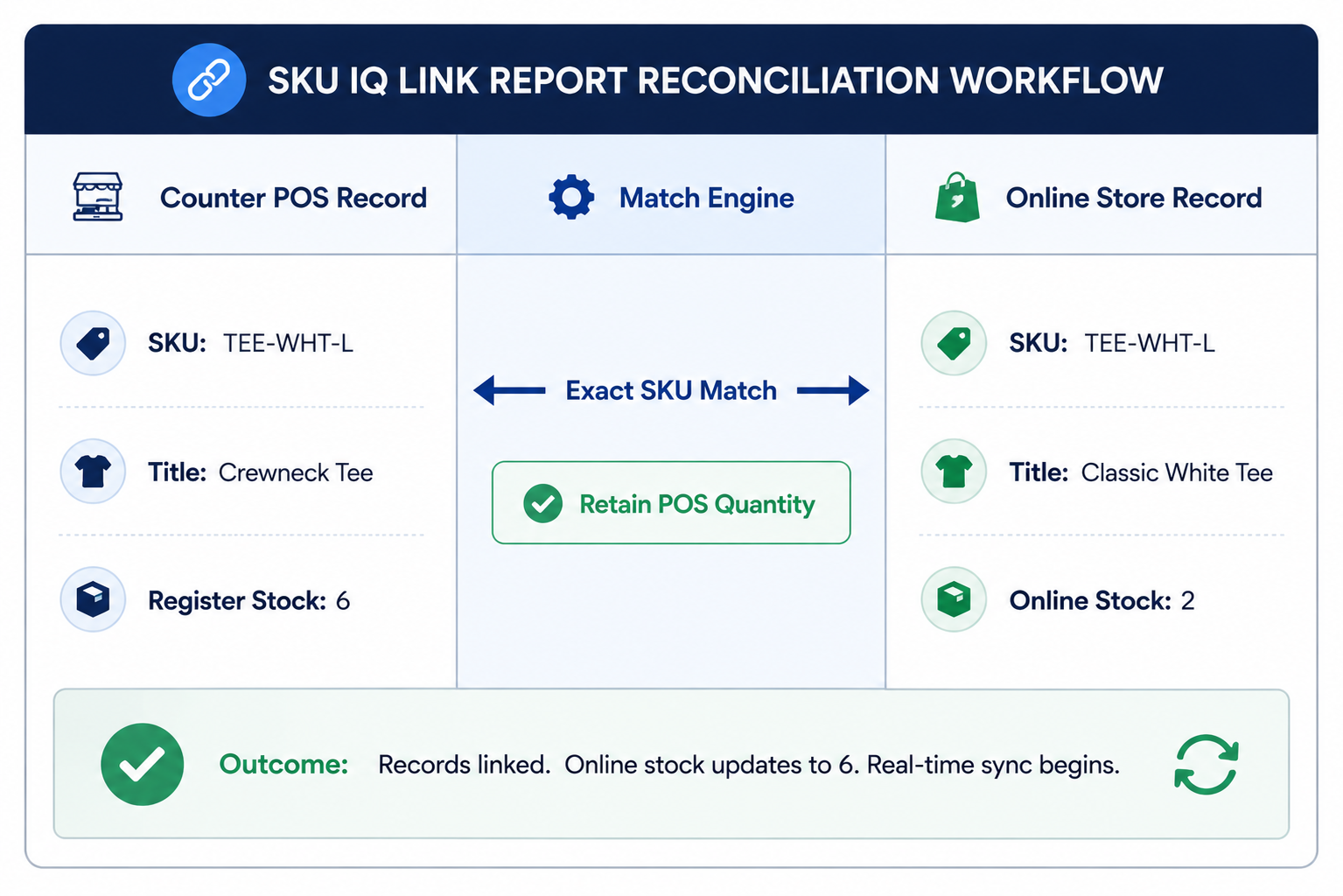
Step 4: Execute a bulk push for items missing from your online shop. The software builds the digital listings and applies starting quantities automatically.
Step 5: Perform a live verification sale. Ring up a test item on your register and confirm that online availability drops within seconds. Know how to get started with SKU IQ
Selecting Software for Your Store
Choosing a connection tool involves checking platform pairs and attribute controls. Review these five technical capabilities before connecting systems:
- Documented Platform Support: Verify supported integrations for your specific POS and eCommerce platform combination before connecting your accounts.
- Attribute Ownership Controls: Confirm the ability to protect online product descriptions from register overwrites.
- Automated Product Matching: Ensure the system offers guided link reports to pair existing records accurately.
- Offline Queueing Capability: Check that the software holds transaction data during store internet outages.
- Direct Onboarding Support: Look for accessible technical assistance during initial catalog reconciliation.
Power Connected Retail for Small Stores with SKU IQ
SKU IQ connects supported point-of-sale and eCommerce platforms so retailers can manage in-store and online inventory more efficiently. It helps independent retailers connect the systems they already use without replacing their existing register setup.
By keeping product and inventory data aligned across channels, SKU IQ reduces the manual work involved in managing separate in-store and online operations. Retailers can maintain more consistent stock information while managing products across their connected platforms.
- Preserve Register Hardware: Keep using your familiar Clover, Square, or Lightspeed setup.
- Support Leading Web Platforms: Connect with Shopify, Wix, WooCommerce, and BigCommerce storefronts.
- Sync Inventory in Real Time: Keep stock quantities aligned across connected sales channels.
- Match Existing Products: Use the guided Link Report to match existing products accurately.
- Reduce Manual Data Entry: Bulk-push catalog items to your online shop with one click.
These capabilities give small retailers a more practical way to build connected retail operations around their existing technology. Instead of maintaining separate product and inventory records, teams can spend less time on repetitive updates and focus more on running the store.
Ready to simplify connected retail? Start your free SKU IQ trial and keep your in-store and online inventory in sync.
FAQs
1. How does connected retail differ from basic multichannel selling?
Multichannel selling involves listing items on multiple platforms with separate stock records. Connected retail unites those channels through real-time synchronization, maintaining a single live inventory pool.
2. Can store owners keep their existing barcode scanners and terminals?
Yes. Connected retail software operates through cloud APIs. You retain your current register terminals, barcode scanners, and receipt printers.
3. Does the system support multiple store locations with one website?
Yes. Quality software links inventory across several store registers while routing online orders to the correct fulfillment location.
4. Can retailers choose which items appear online?
Yes. Products intended solely for in-store checkout remain unlinked on your POS. Items selected for digital commerce synchronize across channels.
5. How does real-time synchronization prevent overselling during promotions?
Webhooks transmit sales data immediately after checkout. Retailers also set buffer thresholds to protect low-stock items from simultaneous purchases.
6. What maintenance does connected retail require for small teams?
The software automates daily synchronization in the background. Staff focus on regular store operations while reviewing unified sales logs as needed.
Share this blog:






Sync and Manage Inventory Across Your Retail Systems
- No more spreadsheets or manual updates
- Real-time sync between POS and eCommerce
- One product catalog, every sales channel
- Save hours managing multiple systems

Ready to stop worrying about inventory?
Start a free trial and experience how much easier retail operations become when your systems stay in sync.