

Updated
October 19, 2026
eCommerce POS Integration: How to Connect Your Physical Store and Online Shop
eCommerce POS integration connects your physical point-of-sale system with your online storefront. SKU IQ connects supported POS and eCommerce platforms so independent physical retailers can sell online while keeping their familiar counter register.


TL;DR
- Retailers managing separate store and online systems lose substantial labor hours to manual double entry and face frequent order cancellations from out-of-sync inventory.
- eCommerce POS integration creates a two-way data connection between your counter register and online store. Supported systems can include Clover, Square, Lightspeed, Shopify, and Wix.
- Real-time synchronization updates online stock availability when an in-store checkout occurs, and updates POS stock when an online order clears.
- Attribute-level sync rules let retailers keep the POS as the master for pricing and barcodes while managing rich descriptions and web photography inside the eCommerce platform.
- SKU IQ connects supported Point of Sale (POS) and eCommerce platforms, helping physical retailers reconcile catalogs and automate inventory flows without changing counter hardware.
For physical retailers, adding an online storefront is one of the most direct ways to reach more customers and create another source of sales. YouGov found that 37% of Americans shop online and in person about equally, showing how common it is for customers to buy both from websites and physical stores.
For many owner-operators, expanding online creates an immediate operational challenge. The physical store and online shop draw from the same pool of inventory.
Say a customer buys the last medium jacket at your physical store. Without inventory synchronization, the online store may continue showing it as available.
An online order placed shortly afterward then creates an inventory conflict. Staff may need to cancel the order and issue a refund.
Receiving new inventory can also create duplicate work. Staff may need to enter product details into the POS and then repeat the process in the eCommerce dashboard. These records can include SKUs, barcodes, prices, and variant information.
These issues persist when physical and digital sales channels operate on disconnected databases. Connected retail data provides a single, synchronized view of inventory, catalog records, and orders.
This guide covers how eCommerce POS integration works and the main integration approaches available to retailers. It also shows how SKU IQ can connect a counter POS with an online store and reduce duplicate data entry.
What Is eCommerce POS Integration?
eCommerce POS integration is the software connection that links a physical point-of-sale (POS) terminal with an online eCommerce platform. It automatically coordinates product quantities, catalog information, and transaction records between your brick-and-mortar register and your digital storefront in real time.
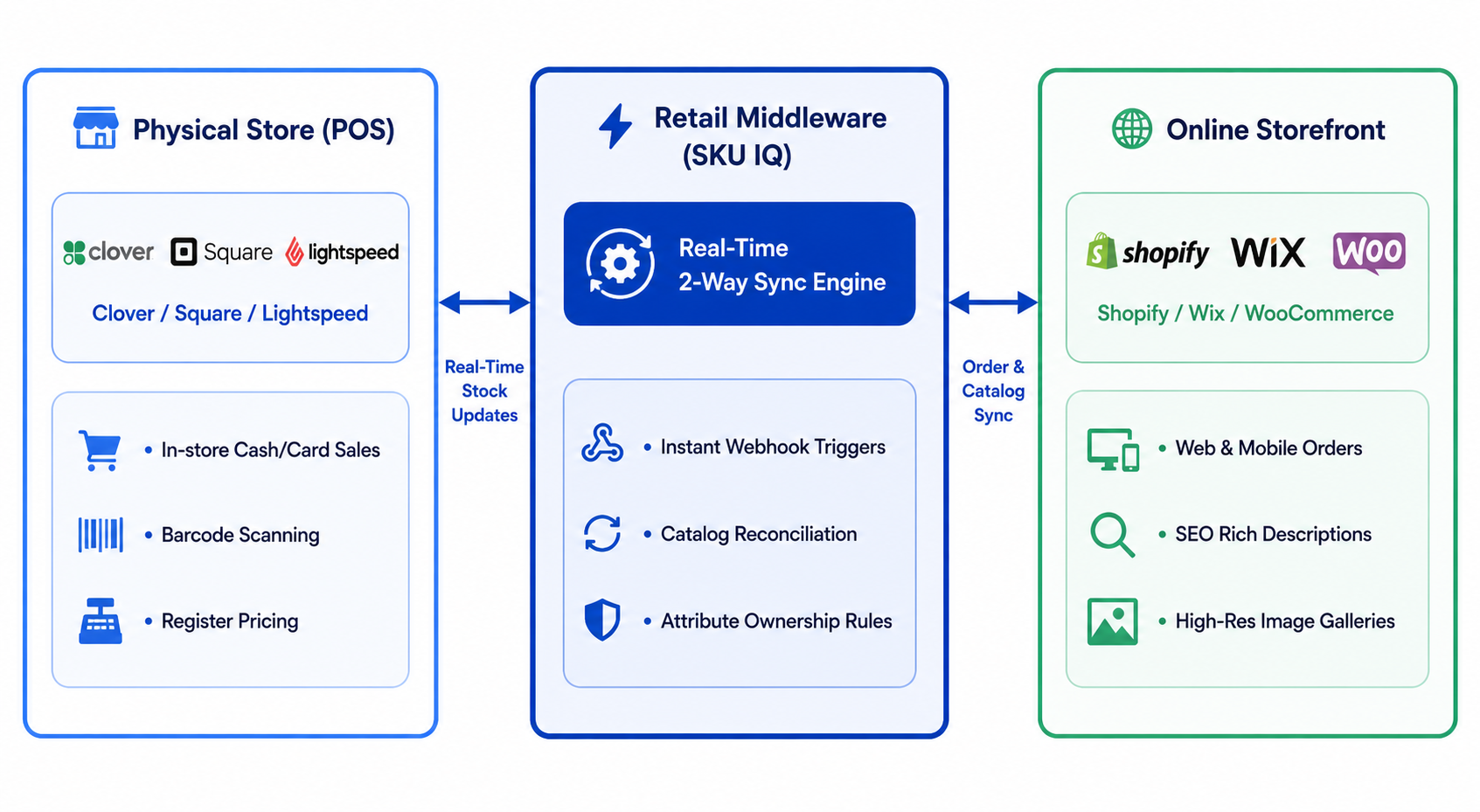
The process begins when a merchant links their retail systems through an integration layer. Whenever a transaction, product edit, or stock adjustment takes place on either platform, the integration captures that event and updates the corresponding record on the connected platform.
Traditional single-channel retail relies on one checkout counter and one backroom storage area. Introducing an online shop adds digital reservations, shipping workflows, and separate web listings. An integrated process ensures that walk-in shoppers and website visitors draw from the same verified stock count.
1. How Integrated Retail Differs From Disconnected Operations
In a disconnected setup, physical and online sales are recorded in separate systems. Staff may need to adjust online quantities manually or compare POS reports with online order records.
An integrated retail environment replaces manual updates with automated bidirectional data transfer:
- In-Store Checkout Flow: When a cashier scans an item at the register, the POS deducts the unit from store inventory. The integration detects this change and immediately reduces available inventory on the website.
- Online Checkout Flow: When an online customer places an order, the website reserves the stock. The integration updates the POS count so counter staff do not sell the reserved unit to a walk-in shopper.
- Catalog Alignment: New products, barcode updates, and price adjustments can be pushed directly from one system to the other, eliminating duplicate data entry.
2. The Core Components of eCommerce POS Integration
A complete integration coordinates four operational components. Each component answers a fundamental question in daily retail management.
The four components work together throughout the sales process. Catalog management establishes product identities, while quantity synchronization keeps stock availability current.
Attribute ownership controls which system updates each field. Order routing then keeps transaction records available for reporting and fulfillment.
eCommerce POS Integration Benefits for Physical Retailers
Connecting your point of sale with your online store can reduce manual inventory work and improve stock accuracy. It also helps retailers support services such as online ordering and store pickup.
1. Elimination of Overselling and Order Cancellations
Overselling occurs when two sales channels sell the same physical unit to different customers before records update. Shared, instant quantity updates remove this risk. An in-store purchase instantly decrements website stock, protecting your online customer promises and saving staff from issuing refunds and apology emails.
2. Reduced Labor and Double-Entry Overhead
Manually creating product listings across two systems consumes valuable time. Entering descriptions, barcodes, prices, and variant matrices (such as sizes and colors) for 50 new items can take several hours of administrative work. A connected system lets you push products from your POS directly to your online storefront in bulk.
3. Protection of In-Store Pickup and Local Fulfillment
BOPIS depends on accurate local inventory. Capital One Shopping's 2026 research found that 97.2 million Americans regularly use BOPIS, while 59% expect stores to offer it. Real-time inventory synchronization helps pickup options reflect available stock, reducing cancellations and supporting smoother fulfillment.
4. Consolidated Sales Reporting and Inventory Valuation
When your sales channels are connected, you no longer need to manually merge separate spreadsheets at month-end to calculate gross revenue, sales tax liabilities, or cost of goods sold (COGS). A centralized transaction flow provides clear visibility into total sales velocity across both channels.
Common POS-eCommerce Integration Challenges
Connecting disparate software systems introduces specific operational hurdles. Understanding these challenges helps retailers implement the correct controls before connecting live systems.
1. Inconsistent SKU and Barcode Structures
Integration platforms use unique identifiers, most commonly the SKU (Stock Keeping Unit) or UPC barcode, to recognize that a product in your POS corresponds to a specific item online. If a product uses one SKU at the register and a different SKU in your eCommerce store, the system cannot link them automatically.
Solution: Standardize your SKU taxonomy prior to setup. Ensure every product variant (such as Medium / Navy) carries a unique, matching SKU on both platforms.
2. Overwriting Rich Online Catalog Data
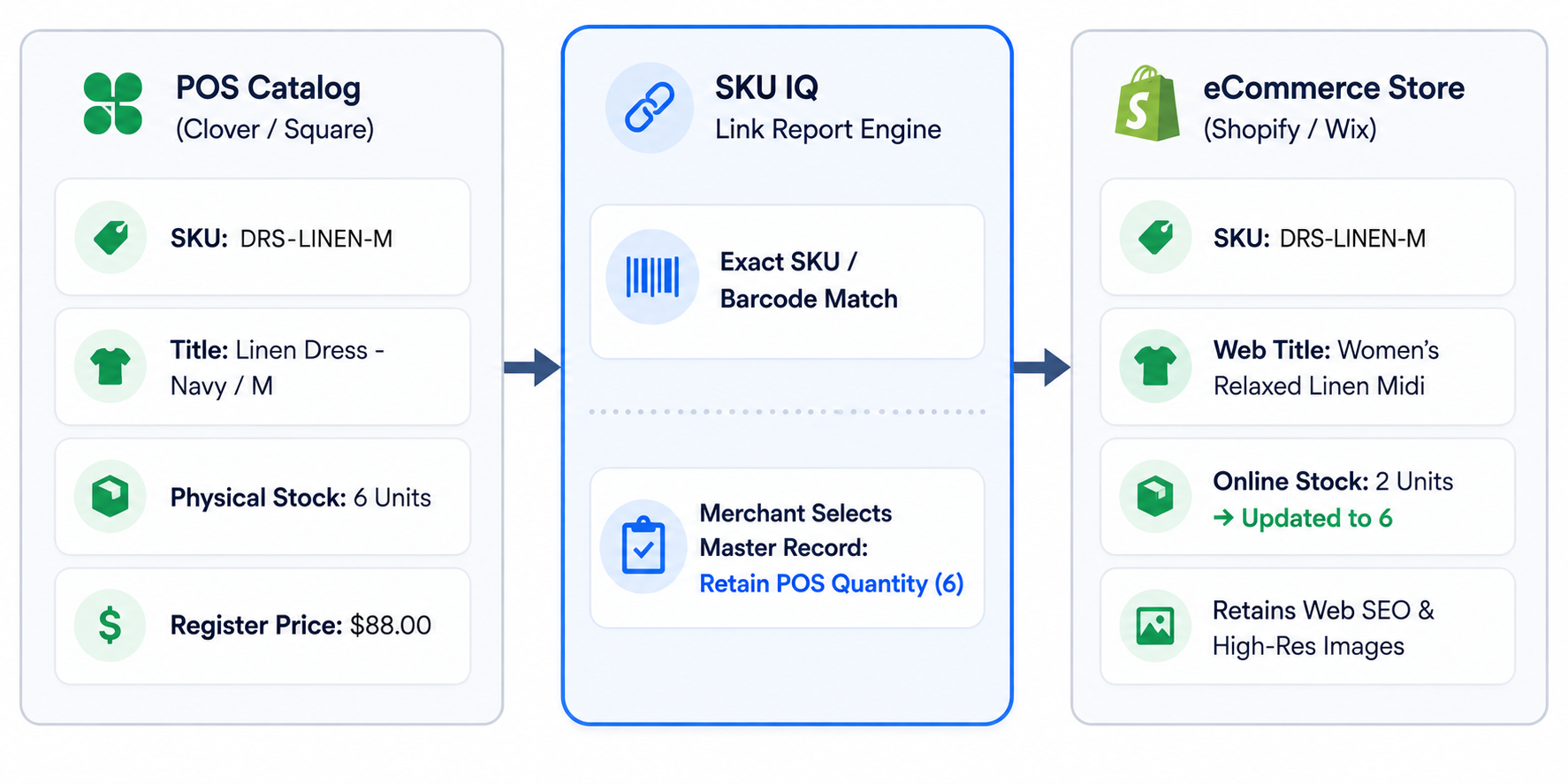
A physical POS catalog prioritizes operational data: short internal titles (e.g., DRS-LIN-NVY-M), retail prices, and barcode numbers. In contrast, an online store requires search-optimized titles (e.g., Women's Relaxed Linen Midi Dress - Navy), rich descriptions, sizing charts, and high-resolution images.
If an integration applies a blunt, one-way overwrite from the POS to the website, it can erase detailed web descriptions.
Solution: Implement attribute-level sync rules that designate which system owns each field. Let your POS control stock levels and base prices, while your eCommerce platform retains ownership over descriptions, tags, and media.
3. Platform API Limitations and Sync Delays
Some basic integration tools rely on periodic batch syncing (e.g., running every 60 minutes) rather than event-driven webhooks. During high-traffic events, such as a Saturday afternoon rush or a holiday promotion, an hourly delay is long enough to cause multiple overselling incidents.
Solution: Choose an integration platform that provides near-instant, event-driven synchronization and includes buffer stock settings (e.g., marking an item out of stock online when POS inventory drops to 1).
4. Handling Returns and Exchange States
An item returned in-store can take multiple paths: it may be returned immediately to the shelf, set aside for damage inspection, or returned to a vendor. If a cashier processes an in-store return without inspecting the item, an automatic stock increase could make a damaged product available for purchase online.
Solution: Establish a clear receiving and returning protocol. Only adjust inventory to sellable status after staff confirm the item's physical condition.
How to Set Up eCommerce POS Integration Step by Step
A dependable integration combines clean catalog data with disciplined operating rules. Before setup, confirm that your POS and eCommerce platform appear on SKU IQ's supported platforms list. Then follow these steps to prepare and connect your systems.
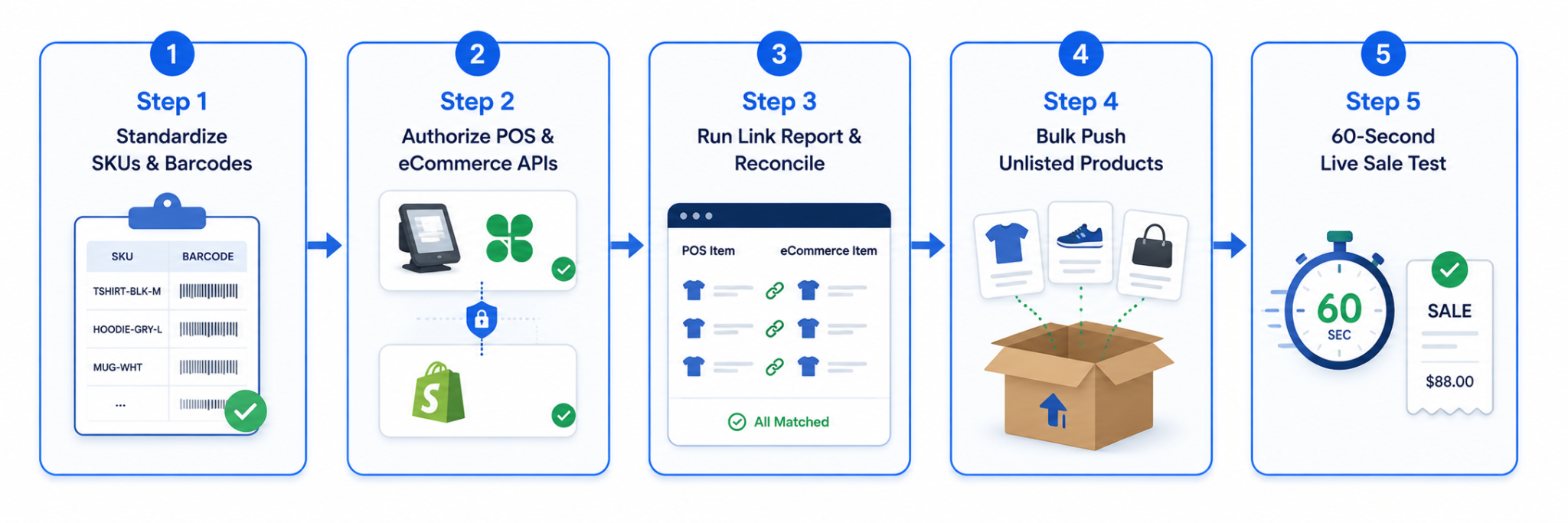
Step 1: Standardize Product Identifiers
Before activating any software connection, review your product catalog. Check that every parent product and individual child variant has a unique SKU or barcode.
Practical Checkpoint: Select twenty of your highest-velocity products. Compare their titles, SKUs, barcodes, and variant options between your POS and your online store. Resolve any discrepancies in spelling or SKU formatting before linking systems.
Step 2: Establish Field-Level Sources of Truth
Document which platform holds authority over each product field:
- Point of Sale (POS): Authoritative for in-store quantity, barcode/UPC, tax codes, and register price.
- eCommerce Store: Authoritative for SEO page titles, long-form descriptions, multi-angle photography, collections, and shipping dimensions.
Setting these rules prevents competing updates and eliminates accidental overwrites during ongoing synchronization.
Step 3: Reconcile Catalogs Using a Guided Link Report
When connecting an established store with an active eCommerce shop, avoid manual linking. Use a guided reconciliation workflow, such as SKU IQ’s Link Report, to scan both catalogs, propose matching items based on SKU or barcode, and allows you to select which platform’s starting quantity should be retained.
Step 4: Use Bulk Push for Initial Catalog Migration
If your physical POS contains hundreds of products not yet listed online, manually rebuilding those items in your eCommerce dashboard creates unnecessary overhead.
Use bulk push capabilities to select positive-quantity items in your POS catalog and push them directly to your online storefront. The integration software automatically creates the products, assigns SKUs, establishes variant relationships, and applies starting quantities.
Step 5: Run a Controlled Verification Test
Before opening the integration to your full customer base, conduct a two-way transaction test:
- Choose a low-cost test product.
- Confirm that stock quantities match on both your POS screen and live website (e.g., 5 units).
- Ring up a sale for 1 unit on your POS terminal.
- Refresh the online product page; verify that online stock decrements to 4 units within seconds.
- Place a test order on your website and confirm that POS stock adjusts accordingly.
How to Choose the Right Integration Approach
Retailers generally have three ways to connect their physical and digital sales channels. Your existing hardware and store count can narrow the options.
If you plan to keep your current systems, check your integration compatibility before comparing approaches. SKU IQ provides platform-specific information about supported connections and available sync features.
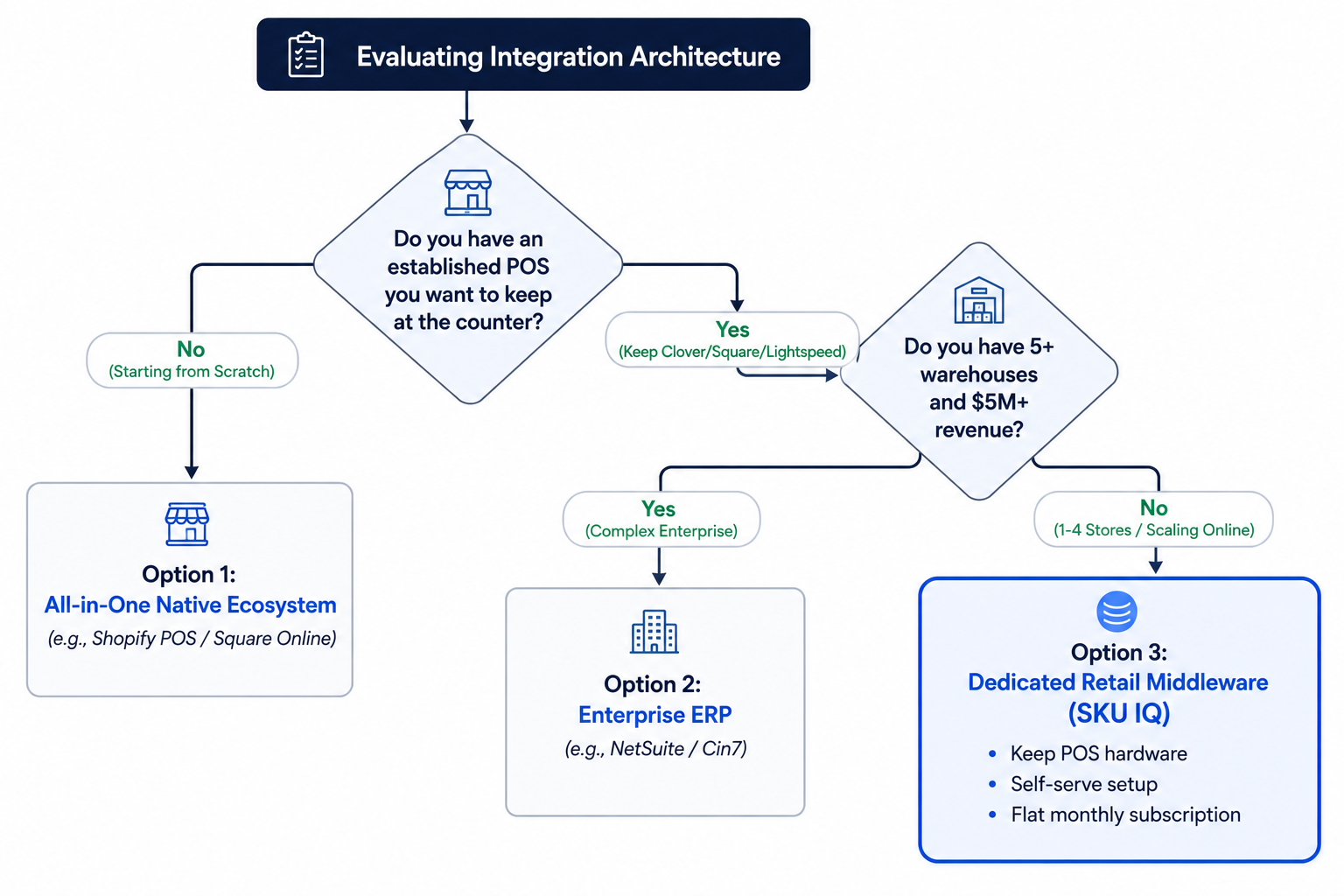
Option 1: All-in-One Native Ecosystems
Some vendors offer single-platform setups, such as adopting Shopify POS for your counter or using Square Online for your website.
Trade-offs: While conceptually simple, all-in-one systems often force compromises. Platforms developed primarily for eCommerce can lack specialized retail counter features (such as complex matrix scanning or custom hardware configurations). Conversely, POS-first platforms may offer rigid website templates. Switching also requires purchasing new register hardware and retraining staff.
Option 2: Enterprise ERP and Warehouse Suites
Enterprise systems provide broad functionality across warehousing, supply chain management, multi-entity accounting, and wholesale distribution.
Trade-offs: For independent retailers with 1 to 3 locations and under 5,000 SKUs, an ERP introduces unnecessary complexity. Implementation cycles take months, require external consultants, and cost thousands of dollars per month.
Option 3: Dedicated No-Code Retail Middleware (SKU IQ)
Retail middleware connects your existing POS directly to your preferred eCommerce platform without custom development.
Trade-offs: This best-of-breed model allows you to keep your trusted counter hardware (such as Clover, Square, or Lightspeed) while selling on a top-tier eCommerce platform (such as Shopify, Wix, WooCommerce, or BigCommerce). Setup takes under an hour, pricing follows a flat subscription, and inventory synchronizes automatically in the background.
Simplify eCommerce POS Integration With SKU IQ
Independent retailers need an integration that aligns with how they actually operate. Store shoppers and online customers draw from the same physical shelves, requiring accurate, automated data synchronization across both channels.
With SKU IQ, you can connect your supported POS and eCommerce platforms while continuing to use the systems and hardware your team already knows.
- Preserve Your Counter Workflow: Keep running your physical store on Clover, Square, or Lightspeed without buying new terminals or disrupting daily checkout operations.
- Automate 2-Way Stock Synchronization: Automatically sync inventory deductions and restocks between your physical counter and online store so both channels reflect accurate availability.
- Guided Product Linking: Use SKU IQ’s Link Report to identify corresponding products across systems and establish your starting source of truth before synchronization begins.
- Fast Catalog Migration: Move your existing POS catalog into a new online store using bulk-push capabilities, eliminating hundreds of hours of manual product entry.
- Centralized Order Visibility: Review a consolidated feed of sales activity and inventory changes across connected systems from a single dashboard.
Before connecting your full catalog, you can confirm supported fields and sync directions for your exact platform pair, then test the connection with a small product group.
Ready to connect your physical store and online shop?
Start your free trial with SKU IQ today to link your product catalogs and activate real-time inventory synchronization.
FAQs
1. Can I keep my existing POS terminal, barcode scanner, and receipt printer?
Yes. Dedicated middleware like SKU IQ operates purely at the software level via secure APIs. You continue using your existing Clover, Square, or Lightspeed hardware and barcode scanners without modifications.
2. What is the difference between batch syncing and real-time webhook syncing?
Batch syncing updates inventory at set intervals (such as once per hour), which creates a latency window where items can oversell. Real-time syncing uses event-driven webhooks to transmit quantity adjustments within seconds of a checkout occurring on either channel.
3. How does the integration handle product variants like size and color?
Quality integration platforms recognize parent-child SKU hierarchies. When an item with multiple sizes or colors syncs, the system maps the corresponding variant records rather than creating separate, disconnected product listings.
4. Will syncing POS inventory overwrite my online SEO titles and descriptions?
Not when attribute-level sync rules are enabled. With SKU IQ, you can configure the POS to control stock counts and retail prices, while allowing your eCommerce platform to retain ownership over long-form descriptions, web categories, and photo galleries.
5. What happens if our physical store temporarily loses internet connection?
During an internet outage, your POS continues recording offline sales locally. Once your internet connection is restored, the integration processes the queued transactions and updates your online inventory levels accordingly.
6. Can I choose which products sync between my POS and website?
Yes. You can choose to sync your entire catalog or selectively link specific items. Products that you only wish to sell in-person remain strictly on your POS without appearing in your online store.
Share this blog:







Sync and Manage Inventory Across Your Retail Systems
- No more spreadsheets or manual updates
- Real-time sync between POS and eCommerce
- One product catalog, every sales channel
- Save hours managing multiple systems

Ready to stop worrying about inventory?
Start a free trial and experience how much easier retail operations become when your systems stay in sync.