

Updated
October 28, 2026
Lightspeed vs Shopify POS: Which Setup Fits Your Retail Store
Lightspeed vs Shopify POS comes down to your retail setup. Lightspeed suits inventory-focused operations, while Shopify POS closely connects with Shopify eCommerce.


TL;DR
- Lightspeed offers detailed inventory and purchasing capabilities suited to retailers with more involved stock management requirements.
- Shopify POS fits naturally when Shopify already serves as the foundation of your eCommerce operation.
- Your inventory requirements, sales channels, and existing technology stack should guide your POS decision.
- Total POS cost includes software, payment processing, hardware, and integrations required for your chosen setup.
- Existing Lightspeed retailers can connect supported Lightspeed systems with Shopify eCommerce through SKU IQ while retaining their POS.
Your point-of-sale (POS) system influences how your team manages inventory and processes sales. It also affects how easily your retail operation connects with eCommerce.
Online retail keeps making that connection more important. eCommerce accounted for 17.1% of total U.S. retail sales in Q2 2026, according to the U.S. Census Bureau. eCommerce sales also increased 12.2% from Q2 2025.
Lightspeed and Shopify POS both support in-person retail, but they approach it differently. Lightspeed focuses heavily on retail management and inventory. Shopify POS sits within Shopify's broader commerce platform.
Your decision also extends beyond replacing one POS with another. Existing Lightspeed retailers can connect supported Lightspeed systems with Shopify eCommerce through SKU IQ.
This guide will compare Lightspeed vs Shopify POS across inventory, omnichannel selling, setup, payments, reporting, integrations, and pricing. You will also see how actual users describe their experiences with both platforms. Finally, we will cover another path for existing Lightspeed retailers. You can keep a supported Lightspeed POS and connect it with Shopify eCommerce through SKU IQ.
Lightspeed vs Shopify POS: Which is better for your retail store?
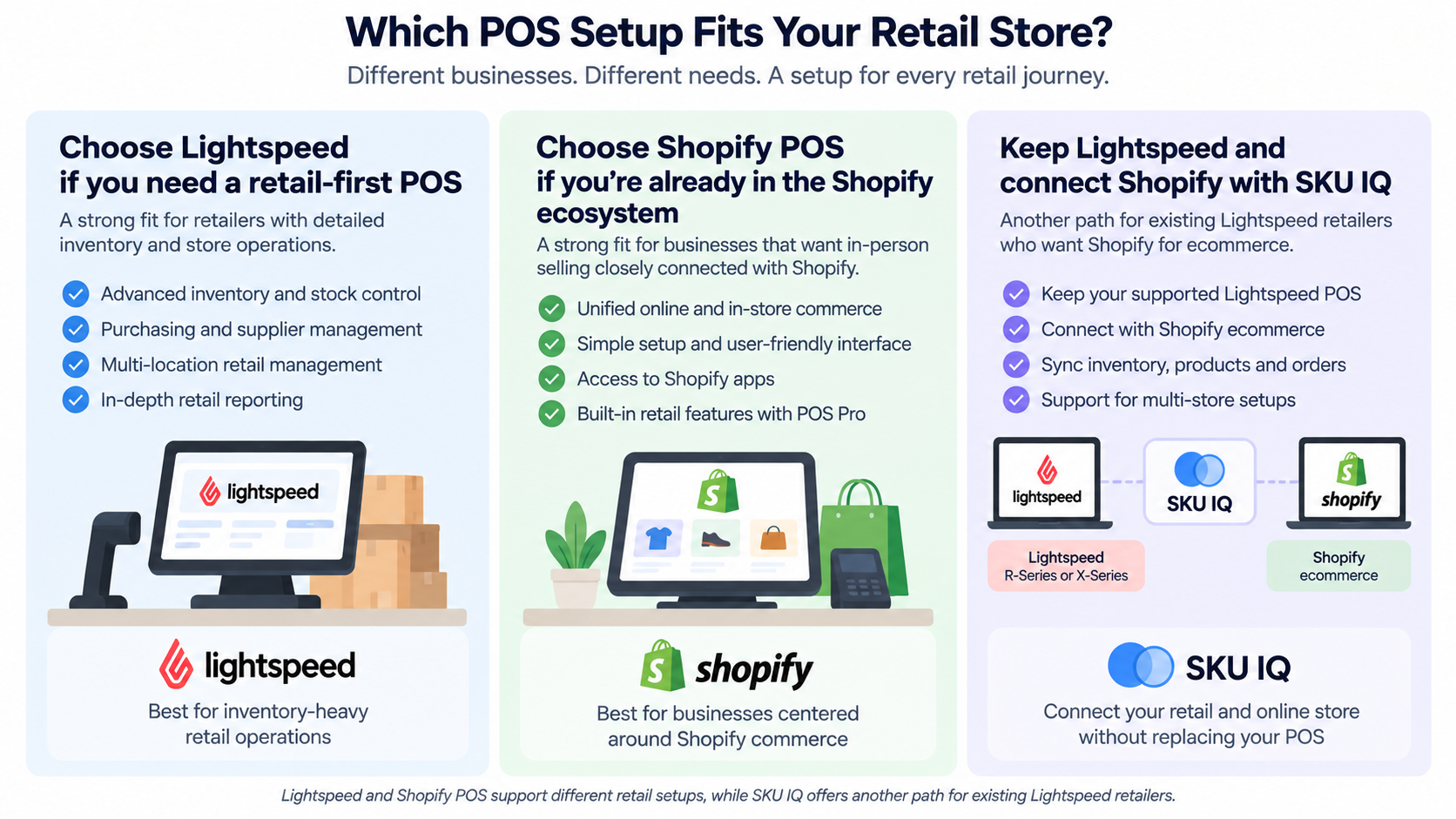
The Lightspeed vs Shopify POS decision depends on your operating model and existing technology. Each platform addresses retail needs from a different starting point.
Lightspeed provides retail-focused inventory and management capabilities. Shopify POS connects in-person sales with Shopify's wider commerce platform.
The table below compares the areas that can have the greatest effect on everyday retail operations.
1. Retail and inventory management
Inventory management sits at the center of retail operations. Your POS should support how you purchase stock and manage products across locations.
Lightspeed provides detailed inventory management capabilities. Retailers can manage products and stock across channels, with one register included in each current U.S. Retail X-Series plan.
Its current plans also include Lightspeed Wholesale and NuORDER Catalog access. Purchase order synchronization is another available capability.
Shopify connects inventory with its wider commerce platform. Its current U.S. plans support up to 10 inventory locations, including the Basic plan.
Shopify POS Pro adds in-store inventory management for brick-and-mortar operations. The add-on also includes advanced staff roles and permissions.
Which should you choose?
Choose Lightspeed if detailed inventory and purchasing workflows carry significant weight in your operation. Consider Shopify POS when Shopify already serves as your primary eCommerce platform.
2. Omnichannel selling
Customers may interact with a retailer across online and in-person channels. Connected systems help inventory and order information follow those interactions.
Lightspeed supports inventory management across retail channels. Its current plans also include built-in eCommerce capabilities, with features varying by plan.
Retailers can also connect Lightspeed with external eCommerce systems. That option can matter when a business prefers another platform for its online store.
Shopify POS starts from Shopify's wider commerce platform. Products and inventory can sit within the same Shopify environment used for eCommerce.
POS Pro adds features designed for physical retail. These include in-store pickup and flexible delivery options.
Which should you choose?
Consider Lightspeed when retail operations drive your technology decisions. Shopify POS can fit retailers that want in-person selling built around an existing Shopify store.
3. Ease of use and setup
POS setup involves catalog preparation and staff training. Hardware configuration and existing integrations can add more work before launch.
User feedback provides useful context beyond vendor feature lists. Capterra reviewers give Lightspeed Retail 4.1 out of 5 for ease of use.
Some Lightspeed reviewers highlight straightforward inventory tracking and checkout workflows. Others report mixed experiences with customer support and specific reporting tasks.
Shopify POS currently scores 4.6 out of 5 for ease of use on Capterra. Recent reviewers frequently mention its straightforward setup and connection with Shopify ecommerce.
Other Shopify POS reviewers mention additional costs and occasional software or hardware issues. These experiences vary, so your existing systems should remain part of the evaluation.
Which should you choose?
Existing Shopify merchants may find Shopify POS familiar because it operates within the same ecosystem. Established Lightspeed teams may value retaining workflows staff already know.
4. Payments and hardware
Payment processing and hardware can materially affect the cost of a POS deployment. Available equipment and payment options can also differ by market.
Lightspeed Retail supports integrated payments and compatible retail hardware. Its current U.S. pricing lists a 1.5% card-present rate with Lightspeed Payments across Basic, Core, and Plus.
Lightspeed states that pricing can vary, with additional service fees possible based on the business and industry. Retailers should confirm their specific rate before calculating total cost.
Shopify supports in-person payments through Shopify POS and compatible hardware. Payment rates vary according to the Shopify plan.
For example, Shopify currently lists a 2.6% + 10¢ in-person card rate for its U.S. Basic plan. Rates differ for Grow and Advanced.
Which should you choose?
Price your complete checkout configuration before deciding. Include required terminals, peripherals, processing costs, and registers across your locations.
5. Reporting and analytics
Retail reporting should support the decisions your team makes regularly. Sales performance and inventory movement are particularly important when comparing POS systems.
Lightspeed provides retail-focused reporting capabilities. Its Core and Plus plans include advanced sales, staff, and inventory reports.
Lightspeed Plus adds Insights, including forecasting and order recommendations. It also provides custom reporting capabilities.
Shopify connects POS reporting with its wider commerce analytics. Shopify's current plans include more than 200 real-time reports and custom analytics.
Reporting capabilities still vary by plan. Shopify Advanced, for example, provides additional options for custom reports and predicted values.
Which should you choose?
Lightspeed can suit retailers seeking retail and inventory-focused analysis. Shopify may fit businesses that want reporting connected with their wider Shopify commerce operation.
6. Integrations and ecosystem
A POS often connects with eCommerce and accounting software. Those connections can influence which system fits your existing technology stack.
Lightspeed's current plans include accounting, eCommerce, and marketing integrations. Shopify also offers an extensive app ecosystem built around its commerce platform.
The integration question becomes especially relevant for retailers already using Lightspeed. Moving to Shopify eCommerce does not automatically require replacing a supported Lightspeed POS.
SKU IQ supports Lightspeed X-Series and R-Series as POS platforms. Shopify is supported as an eCommerce platform.
SKU IQ's current documentation states that Shopify POS itself is unsupported. Retailers should therefore separate the POS decision from their eCommerce platform decision.
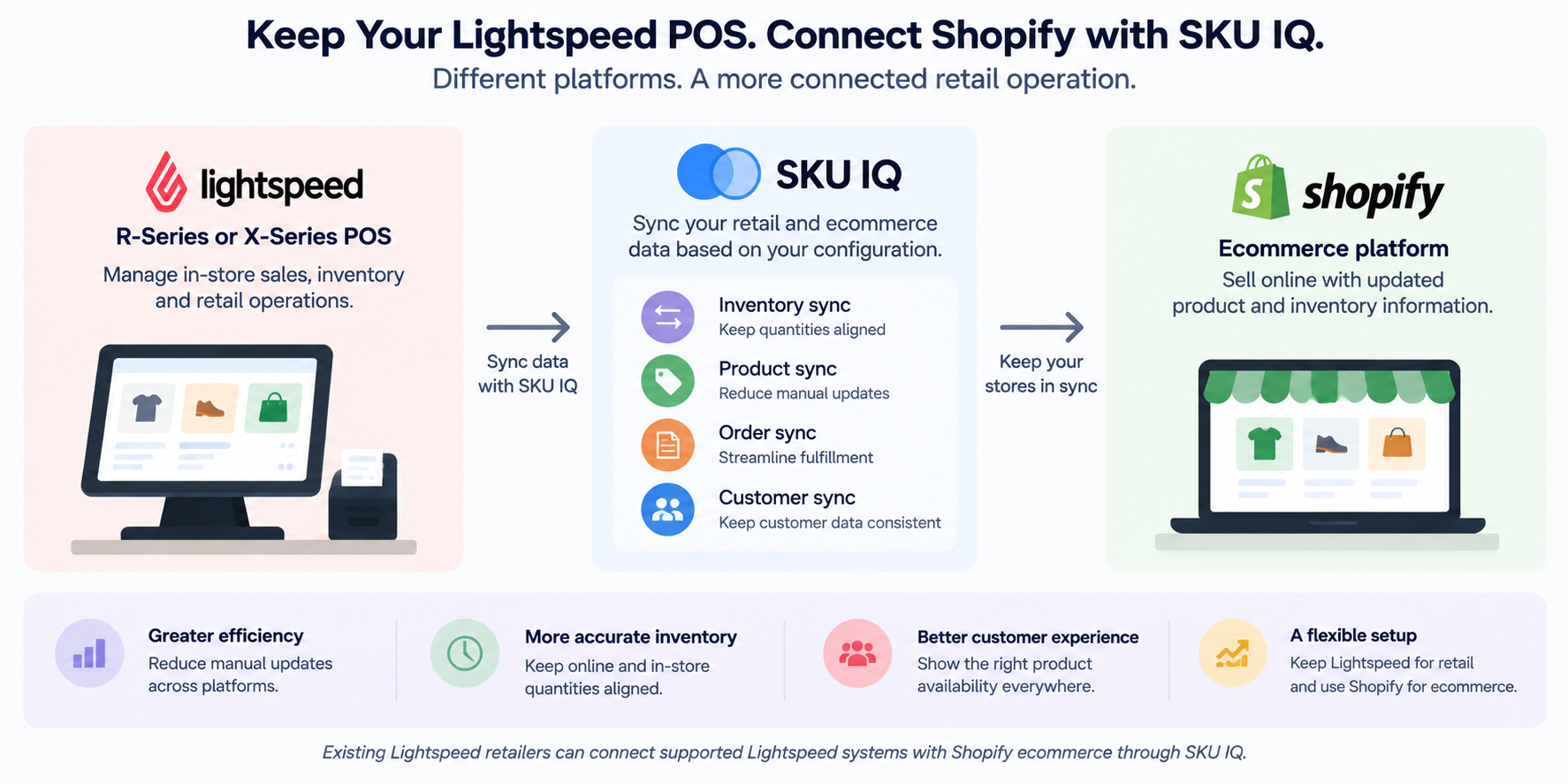
That creates another potential setup. Keep a supported Lightspeed POS for retail operations and connect it with Shopify eCommerce through SKU IQ.
Keep Lightspeed and connect Shopify
Already have a Lightspeed setup that works for your retail operation? You can retain supported Lightspeed X-Series or R-Series while using Shopify for eCommerce.
SKU IQ can synchronize supported product and inventory information between the platforms. Order syncing and multi-store configurations are also available for the Lightspeed-Shopify pairing.
See what SKU IQ supports for Lightspeed and Shopify.
7. Pricing
POS pricing includes more than the base subscription. Registers, locations, hardware, and payment processing can change your total cost.
Lightspeed's official U.S. pricing currently lists Basic at $89 per month. Core costs $149 per month, while Plus costs $289 per month.
These prices apply to Lightspeed Retail X-Series. One register is included with each plan. Lightspeed states that prices can vary and additional service fees may apply.
Shopify's official U.S. pricing currently lists Basic at $29 per month, Grow at $79, and Advanced at $299 when billed yearly.
Standard in-person selling capabilities are included with paid Shopify plans. Retailers can add Shopify POS Pro for $89 per month per location for advanced brick-and-mortar features.
Here is how the current U.S. starting prices compare.
A subscription comparison provides only part of the cost picture. Lightspeed includes one register with each listed plan, while additional registers and locations affect its monthly cost.
Shopify POS Pro charges per location. A retailer operating several stores should account for that structure when estimating the cost of advanced POS functionality.
Payment processing belongs in the same calculation. Hardware requirements and any integrations can further affect your final technology budget.
Which should you choose?
Compare costs using the retail setup you plan to operate. Include locations, registers, hardware, processing costs, and required integrations.
Should you choose Lightspeed or Shopify POS?
The right choice depends on how your business operates and the technology you already use. Feature lists become more useful when viewed through those requirements.
Choose Lightspeed if detailed inventory management and purchasing workflows are priorities. Its retail-focused capabilities can also support businesses managing stock across several locations.
Choose Shopify POS when Shopify already plays a central role in your commerce operation. Keeping online and in-person sales within Shopify may suit that operating model.
A third path applies when Lightspeed already works well for your stores. Keep a supported Lightspeed POS and connect Shopify eCommerce through SKU IQ.
Keep Lightspeed and Connect Shopify with SKU IQ
Moving to Shopify eCommerce does not have to become a complete POS replacement project. Supported Lightspeed retailers can retain their existing system while adding Shopify eCommerce.
SKU IQ supports Lightspeed X-Series and R-Series as POS platforms. Shopify is supported on the eCommerce side of the connection.
SKU IQ can automatically update online and physical inventory as items sell. Retailers can also use supported product synchronization to reduce repetitive catalog work.
Multi-store configurations provide additional options. SKU IQ can combine inventory counts across physical locations and make the aggregated quantity available online.
For Lightspeed and Shopify, SKU IQ also supports routing an online order to one selected store location for fulfillment. This workflow requires manual configuration by SKU IQ's implementation team.
The result is another choice beyond replacing your POS. Your team can keep familiar Lightspeed retail workflows while Shopify supports eCommerce.
Ready to connect Lightspeed with Shopify eCommerce? Start your 14-day free trial with SKU IQ and connect your supported retail and eCommerce platforms.
FAQs
1. Is Lightspeed better than Shopify POS for retail?
Neither POS is a universal fit for every retailer. Lightspeed can suit businesses that prioritize detailed inventory and retail management workflows.
Shopify POS can fit merchants whose eCommerce operation already runs through Shopify. Compare your existing systems and required workflows before choosing.
2. What is the main difference between Lightspeed and Shopify POS?
Lightspeed places a strong emphasis on retail management and inventory. Shopify POS extends Shopify's wider commerce platform into in-person retail.
Your existing setup makes that distinction important. Retail-first operations may value Lightspeed's approach, while Shopify-centered merchants may prefer Shopify POS.
3. Can I use Lightspeed POS with Shopify?
Yes. Supported Lightspeed POS systems can connect with Shopify eCommerce through SKU IQ.
SKU IQ currently supports Lightspeed X-Series and R-Series. Retailers should confirm their Lightspeed version before configuring the integration.
4. Does SKU IQ connect Shopify POS with Lightspeed?
SKU IQ currently supports Shopify as an eCommerce platform, while Shopify POS itself is listed as unsupported.
The relevant SKU IQ setup connects supported Lightspeed POS systems with Shopify eCommerce. Retailers can therefore retain Lightspeed in-store while using Shopify online.
5. Can Lightspeed and Shopify inventory sync?
Yes. SKU IQ supports inventory synchronization between compatible Lightspeed POS systems and Shopify eCommerce.
As items sell online, physical inventory quantities can update. In-store sales can also update corresponding online inventory.
6. Do I need to replace Lightspeed if I want Shopify?
You can keep a supported Lightspeed POS while using Shopify eCommerce. SKU IQ provides an integration between compatible Lightspeed systems and Shopify.
That setup can suit retailers with established Lightspeed workflows who want Shopify for online selling.
Share this blog:







Sync and Manage Inventory Across Your Retail Systems
- No more spreadsheets or manual updates
- Real-time sync between POS and eCommerce
- One product catalog, every sales channel
- Save hours managing multiple systems

Ready to stop worrying about inventory?
Start a free trial and experience how much easier retail operations become when your systems stay in sync.